
Join the Conversation
- Find Answers
- :
- Using Splunk
- :
- Splunk Search
- :
- How do I change the label of the x-axis on a chart...
- Subscribe to RSS Feed
- Mark Topic as New
- Mark Topic as Read
- Float this Topic for Current User
- Bookmark Topic
- Subscribe to Topic
- Mute Topic
- Printer Friendly Page
- Mark as New
- Bookmark Message
- Subscribe to Message
- Mute Message
- Subscribe to RSS Feed
- Permalink
- Report Inappropriate Content

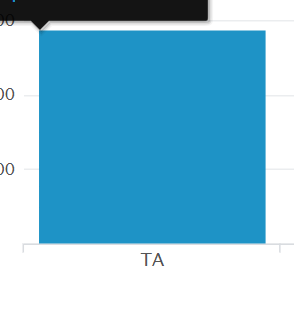
index="all_eqt" Plant=15 ProcessCode=T DefectCode="*" MachineNumber<26 | stats sum(TotalSquareYards) as "Total Square Yards" by DefectCode
How do I change the x-axis "TA" label to display "styles" instead?

- Mark as New
- Bookmark Message
- Subscribe to Message
- Mute Message
- Subscribe to RSS Feed
- Permalink
- Report Inappropriate Content

if you want to change the x axis label , which probably is coming as 'DefectCode' you just can edit the chart type and put a custom x axis label to TA. Visualization > Format > X Axis > Ttile > Custom > (your label.)
However, I think the DefectCode field value is TA which you want to rename as Styles
For this you need to :
|eval DefectCode=if(DefectCode="TA","Styles",DefectCode) BEFORE the stats command.
Now, if you have other DefectCode types you need to append the labels you want after the last , in the if statement
- Mark as New
- Bookmark Message
- Subscribe to Message
- Mute Message
- Subscribe to RSS Feed
- Permalink
- Report Inappropriate Content

Recent thread on this topic here
- Mark as New
- Bookmark Message
- Subscribe to Message
- Mute Message
- Subscribe to RSS Feed
- Permalink
- Report Inappropriate Content
if you want to change the x axis label , which probably is coming as 'DefectCode' you just can edit the chart type and put a custom x axis label to TA. Visualization > Format > X Axis > Ttile > Custom > (your label.)
However, I think the DefectCode field value is TA which you want to rename as Styles
For this you need to :
|eval DefectCode=if(DefectCode="TA","Styles",DefectCode) BEFORE the stats command.
Now, if you have other DefectCode types you need to append the labels you want after the last , in the if statement

Your Guide to Splunk Digital Experience Monitoring
Data Management Digest – November 2025
Upcoming Webinar: Unmasking Insider Threats with Slunk Enterprise Security’s UEBA
