
Turn on suggestions
Auto-suggest helps you quickly narrow down your search results by suggesting possible matches as you type.
Splunk Search
×
Join the Conversation
Without signing in, you're just watching from the sidelines. Sign in or Register to connect, share, and be part of the Splunk Community.
- Find Answers
- :
- Using Splunk
- :
- Splunk Search
- :
- Re: How can i separate Total row in sorting so Tot...
Options
- Subscribe to RSS Feed
- Mark Topic as New
- Mark Topic as Read
- Float this Topic for Current User
- Bookmark Topic
- Subscribe to Topic
- Mute Topic
- Printer Friendly Page
- Mark as New
- Bookmark Message
- Subscribe to Message
- Mute Message
- Subscribe to RSS Feed
- Permalink
- Report Inappropriate Content
How can i separate Total row in sorting so Total row will not be taken affect when the sort caret is clicked in the header

ejmin
Path Finder
10-22-2018
07:23 PM
Here are the example images
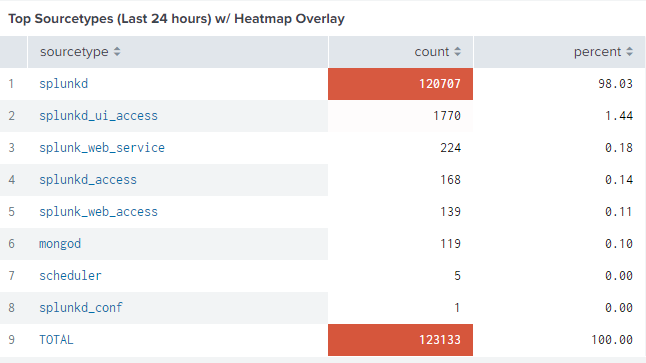
That is the example output then the second one should not be like this
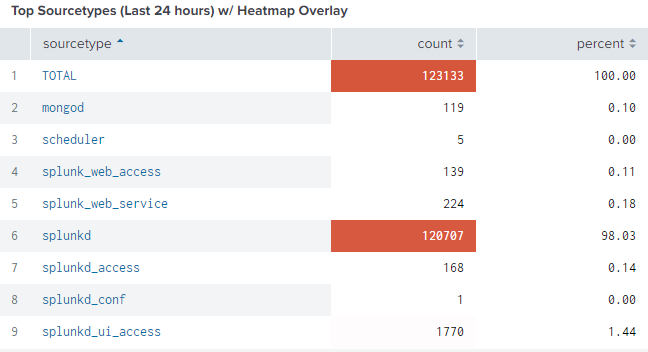
The TOTAL row goes up got mixed up.
So I just want to sort it from row 1-8 and not include 9 as a Total row


- Mark as New
- Bookmark Message
- Subscribe to Message
- Mute Message
- Subscribe to RSS Feed
- Permalink
- Report Inappropriate Content

Vijeta
Influencer
10-22-2018
07:59 PM
Instead of doing the totals using addcoltotals, you can use the table visualization, format option, summary - Totals-Yes
- Mark as New
- Bookmark Message
- Subscribe to Message
- Mute Message
- Subscribe to RSS Feed
- Permalink
- Report Inappropriate Content
ejmin
Path Finder
10-22-2018
08:18 PM
Yes partially you're right.... but in my case my total row is different I put an equation in some fields so it is not only summation of all rows in one field.... Sorry for my uploaded pic it was not the actual working table I just only post the same issue and I forgot to include that my total row is a bit different..

Got questions? Get answers!
Join the Splunk Community Slack to learn, troubleshoot, and make connections with fellow Splunk practitioners in real time!
Meet up IRL or virtually!
Join Splunk User Groups to connect and learn in-person by region or remotely by topic or industry.
Get Updates on the Splunk Community!
Unlocking Unified Insights: New Gigamon Federated Search App for Splunk
In today’s data-heavy environment, organizations are caught in a data distribution dilemma. As data volumes ...
GA: New Data Management App in Splunk Platform
Streamlining Data Management: Introducing a unified experience in Splunk
Managing data at scale shouldn’t feel ...
Announcing Modern Navigation: A New Era of Splunk User Experience
We are excited to introduce the Modern Navigation feature in the Splunk Platform, available to both cloud and ...
