
Join the Conversation
- Find Answers
- :
- Using Splunk
- :
- Splunk Search
- :
- Re: How can I sort results for previous week and c...
- Subscribe to RSS Feed
- Mark Topic as New
- Mark Topic as Read
- Float this Topic for Current User
- Bookmark Topic
- Subscribe to Topic
- Mute Topic
- Printer Friendly Page
- Mark as New
- Bookmark Message
- Subscribe to Message
- Mute Message
- Subscribe to RSS Feed
- Permalink
- Report Inappropriate Content
How can I sort results for previous week and current week in two seperate columns?

Hi Folks,
How can i display the results for 2022-09-02 in Result_Prev column and 2022-09-09 in Result column and keeping the other columns same. Calculating Percent difference from a this week to the previous week results.

any help is appreciated. Thank you !
- Mark as New
- Bookmark Message
- Subscribe to Message
- Mute Message
- Subscribe to RSS Feed
- Permalink
- Report Inappropriate Content

- Mark as New
- Bookmark Message
- Subscribe to Message
- Mute Message
- Subscribe to RSS Feed
- Permalink
- Report Inappropriate Content

@wanda619 My mistake. Should be -0w@w.
* earliest=-2w@w latest=-0w@w
| bin span=1w@w _time
| stats count by CustomerName Error _time
| stats earliest(count) as ResultPrev latest(count) as Result max(_time) as _time by CustomerName Error
| eventstats sum(Result) as "Percent of Total"
| eval "Percent Difference" = round((Result - ResultPrev)/ResultPrev * 100, 2), "Percent of Total" = round(Result / 'Percent of Total' * 100, 2)
- Mark as New
- Bookmark Message
- Subscribe to Message
- Mute Message
- Subscribe to RSS Feed
- Permalink
- Report Inappropriate Content
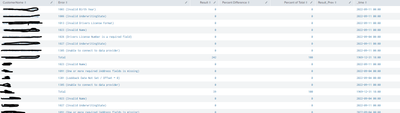
@yuanliu when i try to search itby the above code you mentioned, I did not get the errors i needed as it is blanking and giving 0 outputs on results column.
- Mark as New
- Bookmark Message
- Subscribe to Message
- Mute Message
- Subscribe to RSS Feed
- Permalink
- Report Inappropriate Content
If "Results" column is 0, that means count in the first stats command is also 0, i.e., if you run
* earliest=-2w@w latest=-0w@w
| bin span=1w@w _time
| stats count by CustomerName Error _time
count should all be zero. Can you confirm that? Maybe there's some spelling error? Does the main search return anything?
- Mark as New
- Bookmark Message
- Subscribe to Message
- Mute Message
- Subscribe to RSS Feed
- Permalink
- Report Inappropriate Content
@yuanliu The data is collected daliy as there are daily transactions and the error are shown daily
- Mark as New
- Bookmark Message
- Subscribe to Message
- Mute Message
- Subscribe to RSS Feed
- Permalink
- Report Inappropriate Content
You didn't specify how frequently data is collected, so I'll assume that they can be aggregated into as a weekly stats by something like earliest=-2w@w latest=0w@w. With this assumption, you can do
* earliest=-2w@w latest=0w@w
| bin span=1w@w _time
| stats count by CustomerName Error _time
| stats earliest(count) as ResultPrev latest(count) as Result max(_time) as _time by CustomerName Error
| eventstats sum(Result) as "Percent of Total"
| eval "Percent Difference" = round((Result - ResultPrev)/ResultPrev * 100, 2), "Percent of Total" = round(Result / 'Percent of Total' * 100, 2)
Of course, replace "*" with your real search.

Accelerating Observability as Code with the Splunk AI Assistant
Integrating Splunk Search API and Quarto to Create Reproducible Investigation ...
Congratulations to the 2025-2026 SplunkTrust!
