
Join the Conversation
- Find Answers
- :
- Using Splunk
- :
- Splunk Search
- :
- How can I give source string dynamically in COLLEC...
- Subscribe to RSS Feed
- Mark Topic as New
- Mark Topic as Read
- Float this Topic for Current User
- Bookmark Topic
- Subscribe to Topic
- Mute Topic
- Printer Friendly Page
- Mark as New
- Bookmark Message
- Subscribe to Message
- Mute Message
- Subscribe to RSS Feed
- Permalink
- Report Inappropriate Content
How can I give source string dynamically in COLLECT command?

I want to extract a value dynamically in a subsearch and give the value (string) to source= << string>> of COLLECT command. The following example is extracting YYYYMMDD from the source field and making "src_yyyymmdd" string that will be given to source=<< string>> of the COLLECT command.
    main search... | collect index="ABC" source=[search index="XYZ"
        |head 1 | rex field=source "^FILENAME_(?<YYYYMMDD>\d{8})_.*"
        | eval fieldval="\""+"src_"+YYYYMMDD+"\""
        | table source YYYYMMDD fieldval
        | return $fieldval]
When I checked the above subsearch as a main search, every field value after table command was what I expected.
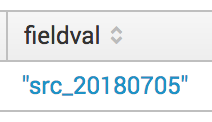
Unfortunately, the result was Error in 'collect' command: Invalid argument: 'src_20180705'
Could someone tell me why this happens and how to solve this problem?
Thanks.
- Mark as New
- Bookmark Message
- Subscribe to Message
- Mute Message
- Subscribe to RSS Feed
- Permalink
- Report Inappropriate Content

@tac24 can you not override the source field even before the collect command with the value you need?
| eval source= [<yourQueryToGetNewSource>]
| collect <yourCommandArguments>
| makeresults | eval message= "Happy Splunking!!!"
- Mark as New
- Bookmark Message
- Subscribe to Message
- Mute Message
- Subscribe to RSS Feed
- Permalink
- Report Inappropriate Content

Hello @tac24,
the documentation states : Syntax: source= (from http://docs.splunk.com/Documentation/Splunk/7.1.2/SearchReference/Collect).
It seems that you have the same problem as this one : https://answers.splunk.com/answers/240798/how-to-return-a-single-value-from-a-subsearch-into.html
So, this should do :
main search... | collect index="ABC" source=[search index="XYZ"
         |head 1 | rex field=source "^FILENAME_(?<YYYYMMDD>\d{8})_.*"
         | eval val="src_".YYYYMMDD
         | eval fieldval="\"".val."\""
         | table source YYYYMMDD fieldval
         | return $fieldval]



Join the Splunk Community Slack to learn, troubleshoot, and make connections with fellow Splunk practitioners in real time!
Join Splunk User Groups to connect and learn in-person by region or remotely by topic or industry.
Self-Healing Pipeline Is Now Generally Available: AI-Powered CIM Compliance
Meet Splunk Observability Studio: AI-Assisted OpenTelemetry Instrumentation Without ...
Federated Search for Cisco Security and Analytics Logging (SAL) is now GA on Splunk ...
