
Join the Conversation
- Find Answers
- :
- Using Splunk
- :
- Splunk Search
- :
- How can I customize my chart to show labels instea...
- Subscribe to RSS Feed
- Mark Topic as New
- Mark Topic as Read
- Float this Topic for Current User
- Bookmark Topic
- Subscribe to Topic
- Mute Topic
- Printer Friendly Page
- Mark as New
- Bookmark Message
- Subscribe to Message
- Mute Message
- Subscribe to RSS Feed
- Permalink
- Report Inappropriate Content

I have a service which we need to monitor discrete states. I only get events if the state changes. I can map these states (e.g. error, init, pending, standby, hot) to numerical values and then graph them on a timechart. With the filldown command I can also maintain the current state to produce a graph that shows the current state at any given time.
What I would like to do next is map those numerical values and provide some content. Ideally it would be to replace the y-axis so that instead of -1 through 3 it would display the states as text. Other options that would also work would be to color each column a different color based on the state (for example, make the column chart turn red when it is in an error state), or provide a legend that would make it easier to read. Basically I want someone to be able to look at the timechart and say at a given time what the state was without wondering what a 0, 1, 2 or 3 means.
This is what I have thus far:
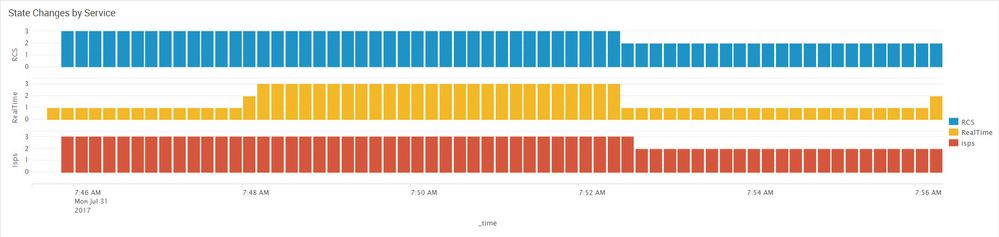
Also, if it gets me the desired effect I could also break it down so RCS, Realtime, and isps do not appear on the same panel but ideally would like to have that functionality as well.
Any ideas that might help on this.
Splunk 6.6.1

- Mark as New
- Bookmark Message
- Subscribe to Message
- Mute Message
- Subscribe to RSS Feed
- Permalink
- Report Inappropriate Content

Run anywhere sample that produces something like you are asking for...
| makeresults
| eval status="error init hot pending standby whatever"
| makemv status
| mvexpand status
| streamstats count as recno
| eval _time=60*floor(_time/60) + 60*recno
| eval mycount = 10
| table _time mycount status
| eval range= case(status="error","red", status="init","purple", status="hot","green", status="pending","gray", status="standby","blue", true(),"black")
| chart sum(mycount) as count by _time status
The height of the bar could be manipulated however you want it.
- Mark as New
- Bookmark Message
- Subscribe to Message
- Mute Message
- Subscribe to RSS Feed
- Permalink
- Report Inappropriate Content
Run anywhere sample that produces something like you are asking for...
| makeresults
| eval status="error init hot pending standby whatever"
| makemv status
| mvexpand status
| streamstats count as recno
| eval _time=60*floor(_time/60) + 60*recno
| eval mycount = 10
| table _time mycount status
| eval range= case(status="error","red", status="init","purple", status="hot","green", status="pending","gray", status="standby","blue", true(),"black")
| chart sum(mycount) as count by _time status
The height of the bar could be manipulated however you want it.
- Mark as New
- Bookmark Message
- Subscribe to Message
- Mute Message
- Subscribe to RSS Feed
- Permalink
- Report Inappropriate Content
I was able to use something very close to this, but also had to use multiseries to get it display exactly how I wanted. Thanks

[Puzzles] Solve, Learn, Repeat: Dynamic formatting from XML events
Enter the Agentic Era with Splunk AI Assistant for SPL 1.4
Stronger Security with Federated Search for S3, GCP SQL & Australian Threat ...
