
Join the Conversation
- Find Answers
- :
- Using Splunk
- :
- Splunk Search
- :
- Re: Help with inputlookup and table
- Subscribe to RSS Feed
- Mark Topic as New
- Mark Topic as Read
- Float this Topic for Current User
- Bookmark Topic
- Subscribe to Topic
- Mute Topic
- Printer Friendly Page
- Mark as New
- Bookmark Message
- Subscribe to Message
- Mute Message
- Subscribe to RSS Feed
- Permalink
- Report Inappropriate Content

I have a lookup table that has several columns as follows, with no data in the "Manager" column:
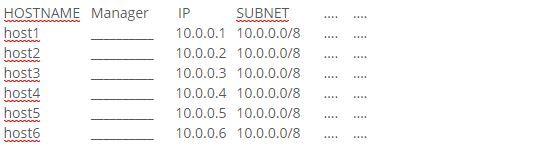
I have an index that has two fields of interest: IP, Manager. The field IP in the index will be the same as that in the lookup table. What I need to accomplish is:
1. Query the index for all instances where the IP in the lookup table is found also in the index
2. Populate the lookup table column "Manager" with the field data found from the query above, in the appropriate row based on IP relationship
Hope somebody can help
- Mark as New
- Bookmark Message
- Subscribe to Message
- Mute Message
- Subscribe to RSS Feed
- Permalink
- Report Inappropriate Content


| inputlookup yourlookuo
| join IP type=inner [ search index=yourindex Manager=* IP=* ]
| table HOSTNAME Manager IP SUBNET ...
| outputlookup yourLookup
This will only get events from yourindex where Manager and IP fields exist, and join them to the lookup, only keeping events that join to the lookup's IP field.
You will need your field names to match on both sides so if the field is called ipAddr in yourindex, you will want to use '| rename ipAddr as IP' in the join.
- Mark as New
- Bookmark Message
- Subscribe to Message
- Mute Message
- Subscribe to RSS Feed
- Permalink
- Report Inappropriate Content
| inputlookup yourlookuo
| join IP type=inner [ search index=yourindex Manager=* IP=* ]
| table HOSTNAME Manager IP SUBNET ...
| outputlookup yourLookup
This will only get events from yourindex where Manager and IP fields exist, and join them to the lookup, only keeping events that join to the lookup's IP field.
You will need your field names to match on both sides so if the field is called ipAddr in yourindex, you will want to use '| rename ipAddr as IP' in the join.
- Mark as New
- Bookmark Message
- Subscribe to Message
- Mute Message
- Subscribe to RSS Feed
- Permalink
- Report Inappropriate Content
One point I left out, not all IP's in the lookup table will match an IP in the index. For example, the lookup table has 1000 records, but only 40 matches between the two sources. Using this query, the lookup table is replaced with 40 matches, removing the 960 unmatched IP's. If I use "append=t", the matched records are ADDED to the list of 1000.
What I am hoping for is that the outcome is that I end up with the same 1000 entries in the lookup table, but with only 40 of them having an entry in the column "Manager". An update, not a replace or append.
- Mark as New
- Bookmark Message
- Subscribe to Message
- Mute Message
- Subscribe to RSS Feed
- Permalink
- Report Inappropriate Content
Ok change type=inner to type=outer.
- Mark as New
- Bookmark Message
- Subscribe to Message
- Mute Message
- Subscribe to RSS Feed
- Permalink
- Report Inappropriate Content
That did it... Thanks very much



Join the Splunk Community Slack to learn, troubleshoot, and make connections with fellow Splunk practitioners in real time!
Join Splunk User Groups to connect and learn in-person by region or remotely by topic or industry.
Persistent Queue at TcpOut — One of Splunk's Most Practical Features
Skip the Awkward Silence: Have a .conf-ersation at .conf26
Rethinking Zero Trust: From Product Purchases to Logical Control Evidence
