
Join the Conversation
- Find Answers
- :
- Using Splunk
- :
- Splunk Search
- :
- Force milliseconds into _raw when milliseconds not...
- Subscribe to RSS Feed
- Mark Topic as New
- Mark Topic as Read
- Float this Topic for Current User
- Bookmark Topic
- Subscribe to Topic
- Mute Topic
- Printer Friendly Page
- Mark as New
- Bookmark Message
- Subscribe to Message
- Mute Message
- Subscribe to RSS Feed
- Permalink
- Report Inappropriate Content
Force milliseconds into _raw when milliseconds not in source file time stamp

When have some queries where milliseconds are important. There is no difficulty if the ms value is stored in the index so that showing the epoch time. We get when milliseconds are in the original time stamp, but when it is not the original time stamp and the two types are intermixed. Examples:
Works well:
Source Time Stamp -- 2018-03-29T18:38:51.661Z
_time in epoch secs 1522348731.661 -- not decimal and milliseconds
Problem:
Source Time Stamp -- 2018-03-29T00:00:38+0000,
_time in epoch secs 1522281638 -- note NO milliseconds
I need this to show 1522281638.000
I would like all _time stamps to include a ms value even if the source does not.
I have tried SEDCMD and converted the stored log, but NOT splunk _time . I assume this is because the time stamp is
extracted before the SEDCMD.
What would be a good method? Is there a global parameter that will cause the ms value to always be filled to .000 on data with only whole seconds?
- Mark as New
- Bookmark Message
- Subscribe to Message
- Mute Message
- Subscribe to RSS Feed
- Permalink
- Report Inappropriate Content

Hey Jim,
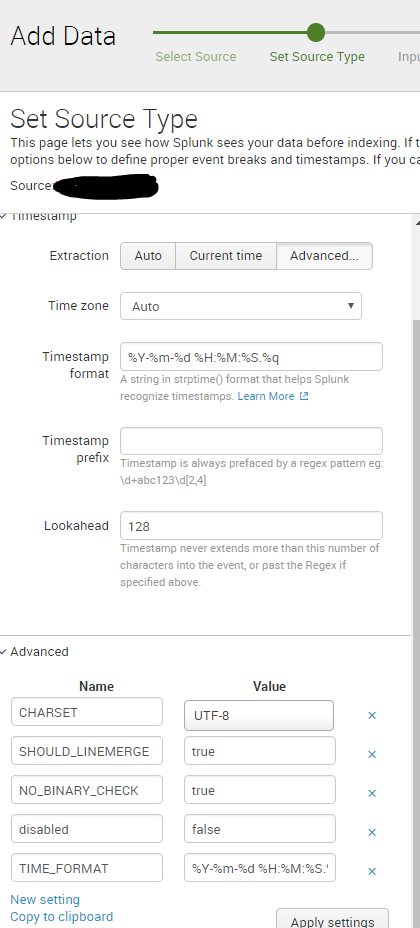
You may need to try something like this http://docs.splunk.com/Documentation/Splunk/7.0.2/Data/Configuretimestamprecognition
I had a similar issue where one event would have milliseconds but the other did not, so I create a props.conf for it.
TIME_FORMAT = <strptime-style format>
In your case I think it would look something like this:
TIME_FORMAT =%Y-%m-%dT%H:%M:%S.%q
You can play with this in the GUI to see how it works, if you have a sample log and try Settings>Add Data>Upload

- Mark as New
- Bookmark Message
- Subscribe to Message
- Mute Message
- Subscribe to RSS Feed
- Permalink
- Report Inappropriate Content
hos_2 ,
I have used time_stamp recognition before, but never in a case where there were intermixed formats like this, one with millisec and one without. Did you specify a single Format in your case? Does just showing a format with .%q force all to have millisecs. I will try it. Thanks for the reply !
- Mark as New
- Bookmark Message
- Subscribe to Message
- Mute Message
- Subscribe to RSS Feed
- Permalink
- Report Inappropriate Content
I used this Splunk answers when i ran into this problem:
https://answers.splunk.com/answers/499990/is-it-possible-to-assign-different-timestamps-base.html
I forgot to mention I also had to use Transforms
- Mark as New
- Bookmark Message
- Subscribe to Message
- Mute Message
- Subscribe to RSS Feed
- Permalink
- Report Inappropriate Content
I believe I had to teach Splunk to recognize the different using Regex and the time_format props.conf settings.
The Add data GUI in the SH really helped me accomplish this as i could test my regex and time_format settings on the fly and see how it would affect my data before it was ingested.

Join the Splunk Community Slack to learn, troubleshoot, and make connections with fellow Splunk practitioners in real time!
Join Splunk User Groups to connect and learn in-person by region or remotely by topic or industry.
[Puzzles] Solve, Learn, Repeat: Matching cron expressions
Design, Compete, Win: Submit Your Best Splunk Dashboards for a .conf26 Pass
May 2026 Splunk Expert Sessions: Security & Observability
