
Join the Conversation
- Find Answers
- :
- Using Splunk
- :
- Splunk Search
- :
- Re: Find Largest Files of Linux Using Splunk
- Subscribe to RSS Feed
- Mark Topic as New
- Mark Topic as Read
- Float this Topic for Current User
- Bookmark Topic
- Subscribe to Topic
- Mute Topic
- Printer Friendly Page
- Mark as New
- Bookmark Message
- Subscribe to Message
- Mute Message
- Subscribe to RSS Feed
- Permalink
- Report Inappropriate Content
Find Largest Files of Linux Using Splunk

Hi everyone,
On my Linux machine, which has Splunk Forwarder and Splunk Add-on for Unix and Linux installed, I'm using this command to find the largest files on my server;
sudo du -a /var/log | sort -n -r | head -n 20
It enlists the first 20 largest files in the /var/log directory.
Now, I would like to do the same using Splunk.
Is there a way to edit the inputs.conf file to be able to index the data onto Splunk or is there any type or search I can make use of to achieve this.
Thanks in advance to anyone willing to help.
Reagards,
Hisham
- Mark as New
- Bookmark Message
- Subscribe to Message
- Mute Message
- Subscribe to RSS Feed
- Permalink
- Report Inappropriate Content

hi @hishamjan,
Enable the monitor for /var/log and set index in inputs.conf in the eadd-on.
[monitor:///var/log]
disabled = 0
index = indexname
Search below query to get top files by size.
| tstats count where index="indexname" earliest=1 by source | sort -count | head 20
If this reply helps you, an upvote/like would be appreciated.
- Mark as New
- Bookmark Message
- Subscribe to Message
- Mute Message
- Subscribe to RSS Feed
- Permalink
- Report Inappropriate Content
Hi @manjunathmeti ,
Thanks for the reply,
I edited my inputs.conf file with;
[monitor://2>/dev/null]
index = monitor
disabled = false
(restarted splunk after that)
and my search with its result is attached below:
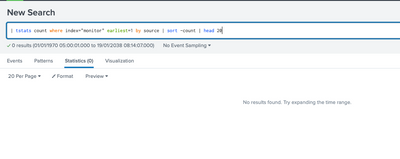
It isn't returning anything (All-Time, Last 24 hrs, Last 4 hours etc)...
Is there anything I'm doing wrong?
your help is appreciated.
Regards
- Mark as New
- Bookmark Message
- Subscribe to Message
- Mute Message
- Subscribe to RSS Feed
- Permalink
- Report Inappropriate Content
Your monitor path is not correct. It should be [monitor:///var/log].


Join the Splunk Community Slack to learn, troubleshoot, and make connections with fellow Splunk practitioners in real time!
Join Splunk User Groups to connect and learn in-person by region or remotely by topic or industry.
Your Feedback. Our Roadmap. Visit the PX Feedback Booth at .conf26
Agentic SOC Triage: Investigating Splunk ES Notables with MCP Server and a Local LLM
Painting a Clearer Picture: Creating Cross-Domain Visibility with AI Canvas
