
Join the Conversation
- Find Answers
- :
- Using Splunk
- :
- Splunk Search
- :
- Re: Field extraction
- Subscribe to RSS Feed
- Mark Topic as New
- Mark Topic as Read
- Float this Topic for Current User
- Bookmark Topic
- Subscribe to Topic
- Mute Topic
- Printer Friendly Page
- Mark as New
- Bookmark Message
- Subscribe to Message
- Mute Message
- Subscribe to RSS Feed
- Permalink
- Report Inappropriate Content

Hi Splunk team, I would like to receive your dedicated help.
I have a string field, the field's structure is name_timestamp.
The name contains underscores between words, after the name, there is another underscore. Finally, there is a full date. for example: this_is_an_example_09_13_2021.
My goal is to extract the name from this field. for this example, I would like to receive this_is_an_example.
Is it possible?
Thanks in advance! 😊
- Mark as New
- Bookmark Message
- Subscribe to Message
- Mute Message
- Subscribe to RSS Feed
- Permalink
- Report Inappropriate Content


Since you are not extracting the time (or at least that wasn't the requirement), you will probably find that the current anchor pattern will suffice - if you do need to extend it add _\d{2}_\d{2}
- Mark as New
- Bookmark Message
- Subscribe to Message
- Mute Message
- Subscribe to RSS Feed
- Permalink
- Report Inappropriate Content
First of all, Thank you both!
I forgot that in addition to the full date, this field contains the hour and minutes. for example,
this_is_an_example_09_13_2021_03_45.
How should I change the rex command?
Thanks!
- Mark as New
- Bookmark Message
- Subscribe to Message
- Mute Message
- Subscribe to RSS Feed
- Permalink
- Report Inappropriate Content
Since you are not extracting the time (or at least that wasn't the requirement), you will probably find that the current anchor pattern will suffice - if you do need to extend it add _\d{2}_\d{2}
- Mark as New
- Bookmark Message
- Subscribe to Message
- Mute Message
- Subscribe to RSS Feed
- Permalink
- Report Inappropriate Content
Thanks so much! It's working 😊
- Mark as New
- Bookmark Message
- Subscribe to Message
- Mute Message
- Subscribe to RSS Feed
- Permalink
- Report Inappropriate Content
Where should I put it?
for example, this is the received output.
Note: The name may contain numbers.
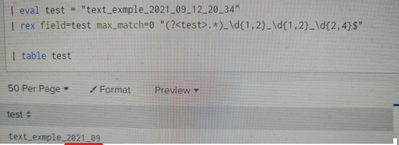
Thanks much!
- Mark as New
- Bookmark Message
- Subscribe to Message
- Mute Message
- Subscribe to RSS Feed
- Permalink
- Report Inappropriate Content

"(?<test>.*)" basically match everything on this field. When we are adding "_\d{4}_\d{2}_\d{2}_\d{2}_\d{2}$" we are requiring that at the end of this string there are _ + 4 digits + _ + 2 digits ... etc. and everything before that is put on test field. So based on your string just add those _\d{4} and _\d{2} to correct places. And if those days, hours, minutes and seconds can be only in one (1) digit long then use _\d{1,2} to catch also those.
So based on your screenshot you should use e.g.
rex field=test max_match=0 "(?<test>.*)_\d{4}_\d{2}_\d{2}_\d{2}_\d{2}$" If you are using name test on field and in capture group then you are replacing the content of this field with file name instead of creating a new field for file_name. So if you need the original file name later on then it's better to use something else than test as a capture group name.
r. Ismo
- Mark as New
- Bookmark Message
- Subscribe to Message
- Mute Message
- Subscribe to RSS Feed
- Permalink
- Report Inappropriate Content
Hi
yes it is. You could try this
....
| rex field=name_timestamp max_match=0 "(?<file_name>.*)_\d{1,2}_\d{1,2}_\d{2,4}$"
r. Ismo
- Mark as New
- Bookmark Message
- Subscribe to Message
- Mute Message
- Subscribe to RSS Feed
- Permalink
- Report Inappropriate Content
| rex "(?<words>[a-zA-Z_]+)_\d{2}_\d{2}_\d{4}"
Join the Splunk Community Slack to learn, troubleshoot, and make connections with fellow Splunk practitioners in real time!
Join Splunk User Groups to connect and learn in-person by region or remotely by topic or industry.
Your Path to AgenticOps: AI Experiences for Every Splunk Practitioner
The Data Connection - October 2026
Beyond the Acceleration Zone: Maximizing Your Success with Splunk Customer Experience ...
