
Join the Conversation
- Find Answers
- :
- Using Splunk
- :
- Splunk Search
- :
- Field extraction from one multivalued event
- Subscribe to RSS Feed
- Mark Topic as New
- Mark Topic as Read
- Float this Topic for Current User
- Bookmark Topic
- Subscribe to Topic
- Mute Topic
- Printer Friendly Page
- Mark as New
- Bookmark Message
- Subscribe to Message
- Mute Message
- Subscribe to RSS Feed
- Permalink
- Report Inappropriate Content

Hi experts,
I want to extract below fields in separate separate event to further work on it .
INFO 2023-12-11 17:06:01,726 [[Runtime].Pay for NEW_API : [
{
"API_NAME": "wurfbdjd",
"DEP_DATE": "2023-12-08T00:00:00"
},
{
"API_NAME": "mcbhsa",
"DEP_DATE": "2023-12-02T00:00:00"
},
{
"API_NAME": "owbaha",
"DEP_DATE": "2023-12-02T00:00:00"
},
{
"API_NAME": "pdjna7aha",
"DEP_DATE": "2023-11-20T00:00:00"
}
]
I want to extrcat dep_date and apiname in separate row
| DEP_DATE | API_NAME |
| 2023-12-08T00:00:00 | wurfbdjd |
| mcbhsa |
- Mark as New
- Bookmark Message
- Subscribe to Message
- Mute Message
- Subscribe to RSS Feed
- Permalink
- Report Inappropriate Content

Assuming the data you shared is _raw. I think this SPL will do what you are looking for.
| makeresults
    | fields - _time
    | eval
        _raw="INFO 2023-12-11 17:06:01,726 [[Runtime].Pay for NEW_API : [
{
\"API_NAME\": \"wurfbdjd\",
\"DEP_DATE\": \"2023-12-08T00:00:00\"
},
{
\"API_NAME\": \"mcbhsa\",
\"DEP_DATE\": \"2023-12-02T00:00:00\"
},
{
\"API_NAME\": \"owbaha\",
\"DEP_DATE\": \"2023-12-02T00:00:00\"
},
{
\"API_NAME\": \"pdjna7aha\",
\"DEP_DATE\": \"2023-11-20T00:00:00\"
}
]"

    ``` Extract entire array of json objects ```
    | rex max_match=0 "NEW\_API\s+:\s+(?<json_array>\[(?:(?:.*)\n?)+\])"
    ``` parse out each individual json object from the array as a multivalue field ```
    | eval
        json_objects=spath(json_array, "{}")
    | fields - json_array, _raw
    ``` mvexpand the multivalue json ```
    | mvexpand json_objects
    ``` extract all fields from json blobs ```
    | spath input=json_objects
    | fields - json_objects
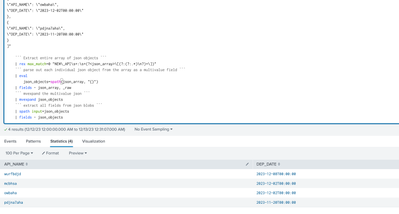
- Mark as New
- Bookmark Message
- Subscribe to Message
- Mute Message
- Subscribe to RSS Feed
- Permalink
- Report Inappropriate Content
Assuming the data you shared is _raw. I think this SPL will do what you are looking for.
| makeresults
    | fields - _time
    | eval
        _raw="INFO 2023-12-11 17:06:01,726 [[Runtime].Pay for NEW_API : [
{
\"API_NAME\": \"wurfbdjd\",
\"DEP_DATE\": \"2023-12-08T00:00:00\"
},
{
\"API_NAME\": \"mcbhsa\",
\"DEP_DATE\": \"2023-12-02T00:00:00\"
},
{
\"API_NAME\": \"owbaha\",
\"DEP_DATE\": \"2023-12-02T00:00:00\"
},
{
\"API_NAME\": \"pdjna7aha\",
\"DEP_DATE\": \"2023-11-20T00:00:00\"
}
]"

    ``` Extract entire array of json objects ```
    | rex max_match=0 "NEW\_API\s+:\s+(?<json_array>\[(?:(?:.*)\n?)+\])"
    ``` parse out each individual json object from the array as a multivalue field ```
    | eval
        json_objects=spath(json_array, "{}")
    | fields - json_array, _raw
    ``` mvexpand the multivalue json ```
    | mvexpand json_objects
    ``` extract all fields from json blobs ```
    | spath input=json_objects
    | fields - json_objects
- Mark as New
- Bookmark Message
- Subscribe to Message
- Mute Message
- Subscribe to RSS Feed
- Permalink
- Report Inappropriate Content


Hi @nehamvinchankar,
this seems to be a json log, so you could use the INDEXED_EXTRACTIONS=true in the sourcetype or the spath command.
In addition, if you want to use a regex, you can use this:
| rex "(?ms)\"API_NAME\": \"(?<API_NAME>[^\"]+)\",\n\"DEP_DATE\": \"(?<DEP_DATE>[^\"]+)\""that you can test at https://regex101.com/r/cPQ2By/1
Ciao.
Giuseppe
- Mark as New
- Bookmark Message
- Subscribe to Message
- Mute Message
- Subscribe to RSS Feed
- Permalink
- Report Inappropriate Content
not working fields are not getting extracted
- Mark as New
- Bookmark Message
- Subscribe to Message
- Mute Message
- Subscribe to RSS Feed
- Permalink
- Report Inappropriate Content
Hi @nehamvinchankar,
does the regex extract only one value or doesn't it extract any value?
if only one value, plese try this:
| rex max_match=0 "(?ms)\"API_NAME\": \"(?<API_NAME>[^\"]+)\",\n\"DEP_DATE\": \"(?<DEP_DATE>[^\"]+)\""if no values, please check the source, because using the source you shared the regex extracts all the values, as you can test in regex101
Ciao.
Giuseppe


Join the Splunk Community Slack to learn, troubleshoot, and make connections with fellow Splunk practitioners in real time!
Join Splunk User Groups to connect and learn in-person by region or remotely by topic or industry.
Thanks for the Memories: .conf26 Took Learning to New Heights
Best Practices: Splunk auto adjust pipeline queue
Splunk Auto Ingestion Parallel Pipeline Scaling
