
Join the Conversation
- Find Answers
- :
- Using Splunk
- :
- Splunk Search
- :
- Extracting multiple values from single unstructure...
- Subscribe to RSS Feed
- Mark Topic as New
- Mark Topic as Read
- Float this Topic for Current User
- Bookmark Topic
- Subscribe to Topic
- Mute Topic
- Printer Friendly Page
- Mark as New
- Bookmark Message
- Subscribe to Message
- Mute Message
- Subscribe to RSS Feed
- Permalink
- Report Inappropriate Content

Hi,
In a single event, we have a field named username which is occurring multiple time in the events in raw data and username are different. How can we extract this username field since there are multiple values in the same event. Please help, this is the SAP spool data which is forwarded to splunk cloud. Attaching the screensho with mutiple usernames in single event

- Mark as New
- Bookmark Message
- Subscribe to Message
- Mute Message
- Subscribe to RSS Feed
- Permalink
- Report Inappropriate Content


Looks like you need something like
...
| rex max_match=0 field=_raw "LINE\":\"\|(?<user>[^\s]*)\s"
| mvexpand user- Mark as New
- Bookmark Message
- Subscribe to Message
- Mute Message
- Subscribe to RSS Feed
- Permalink
- Report Inappropriate Content
Looks like you need something like
...
| rex max_match=0 field=_raw "LINE\":\"\|(?<user>[^\s]*)\s"
| mvexpand user- Mark as New
- Bookmark Message
- Subscribe to Message
- Mute Message
- Subscribe to RSS Feed
- Permalink
- Report Inappropriate Content
@ITWhisperer Thank you , the expression is working fine in search.
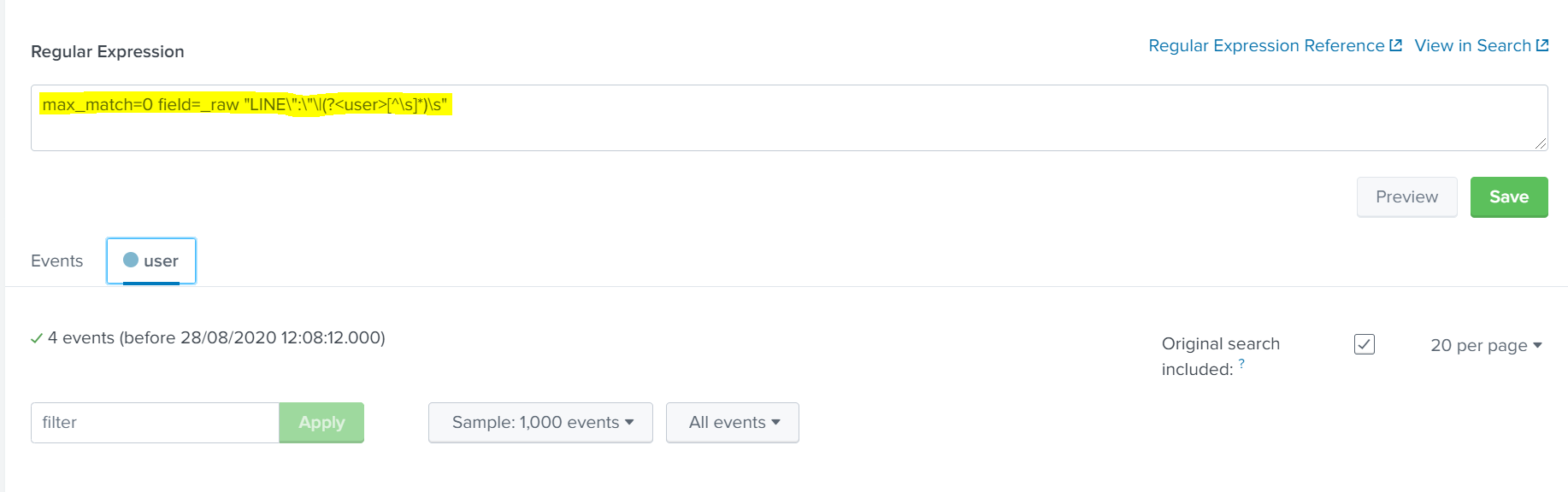
When I am trying to give the same expression while extracting fields, so that the field user will be permanent, Its not working. I had chosen 'I prefer to write the regular expression myself ' and had added the expression. But I am not able to view the field.Could you please suggest whats causing the issue, but the same is working in search.
Attaching screenshot for reference. Please suggest if its the same way we have to give regular expression while extracting fields
- Mark as New
- Bookmark Message
- Subscribe to Message
- Mute Message
- Subscribe to RSS Feed
- Permalink
- Report Inappropriate Content
Hi @dkgs
You can only provide the expression
LINE\":\"\|(?<user>[^\s]*)\sUnfortunately, I can't see a way of providing the max_match=0 part so you will only be able to extract the first match.
To get all the instances in a multivalue field on a more permanent basis, you may have to adopt the transforms and props configuration approach


Join the Splunk Community Slack to learn, troubleshoot, and make connections with fellow Splunk practitioners in real time!
Join Splunk User Groups to connect and learn in-person by region or remotely by topic or industry.
Fuel Your Journey: What’s Waiting for You at the .conf26 Acceleration Station
Join the Final Session of the Data Management & Federation Bootcamp Series
From Data to Insight: Announcing the Winners of the Splunk Dashboard Contest
