
Join the Conversation
- Find Answers
- :
- Using Splunk
- :
- Splunk Search
- :
- Extracting details from windows logs
- Subscribe to RSS Feed
- Mark Topic as New
- Mark Topic as Read
- Float this Topic for Current User
- Bookmark Topic
- Subscribe to Topic
- Mute Topic
- Printer Friendly Page
- Mark as New
- Bookmark Message
- Subscribe to Message
- Mute Message
- Subscribe to RSS Feed
- Permalink
- Report Inappropriate Content
Extracting details from windows logs

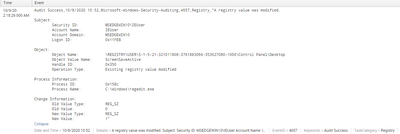
Hi I'm new to splunk and hope you guys are having a good day!
How can I query and extract out the information from this event field? Example I would like to the object value name and the change information. From there i'll create a column and display it values extracted.
I feel that the windows log itself is quite difficult to search due to the limited number of fields
Thank you in advance
- Mark as New
- Bookmark Message
- Subscribe to Message
- Mute Message
- Subscribe to RSS Feed
- Permalink
- Report Inappropriate Content


| rex "Object Value Name:\s+(?<ObjectValueName>\S+)"
| rex "Old Value Type:\s+(?<OldValueType>\S+)"
| rex "Old Value:\s+(?<OldValue>\S+)"
| rex "New Value Type:\s+(?<NewValueType>\S+)"
| rex "New Value:\s+(?<NewValue>\S+)"- Mark as New
- Bookmark Message
- Subscribe to Message
- Mute Message
- Subscribe to RSS Feed
- Permalink
- Report Inappropriate Content
Hey! Thanks I think my mistake was with the my regex...
Just a follow up question, with my current results, would I be able to search from my current index and add on other details to correlate? or is there another way around it?
Right now, i would like to add any activity with cmd.exe to correlate or event id specific
Thank you so much
edit: found out about sub-search, but any advice or tips would be appreicated too
- Mark as New
- Bookmark Message
- Subscribe to Message
- Mute Message
- Subscribe to RSS Feed
- Permalink
- Report Inappropriate Content
You can extract the fields and then do further searches e.g.
| rex "Process Name:\s+(?<ProcessName>\S+)"
| where like(ProcessName, "%cmd.exe")
It then depends what else you want to do. What do you want to correlate other events with? You can do a lot of things, so long as the data is there, there is usually a way to extract information, although to be fair some are easier than others and possibly not all are possible.

Join the Splunk Community Slack to learn, troubleshoot, and make connections with fellow Splunk practitioners in real time!
Join Splunk User Groups to connect and learn in-person by region or remotely by topic or industry.
Announcing Modern Navigation: A New Era of Splunk User Experience
Modernize your Splunk Apps – Introducing Python 3.13 in Splunk
Step into “Hunt the Insider: An Splunk ES Premier Mystery” to catch a cybercriminal ...
