
Join the Conversation
- Find Answers
- :
- Using Splunk
- :
- Splunk Search
- :
- Re: Expanded stacked column chart
- Subscribe to RSS Feed
- Mark Topic as New
- Mark Topic as Read
- Float this Topic for Current User
- Bookmark Topic
- Subscribe to Topic
- Mute Topic
- Printer Friendly Page
- Mark as New
- Bookmark Message
- Subscribe to Message
- Mute Message
- Subscribe to RSS Feed
- Permalink
- Report Inappropriate Content

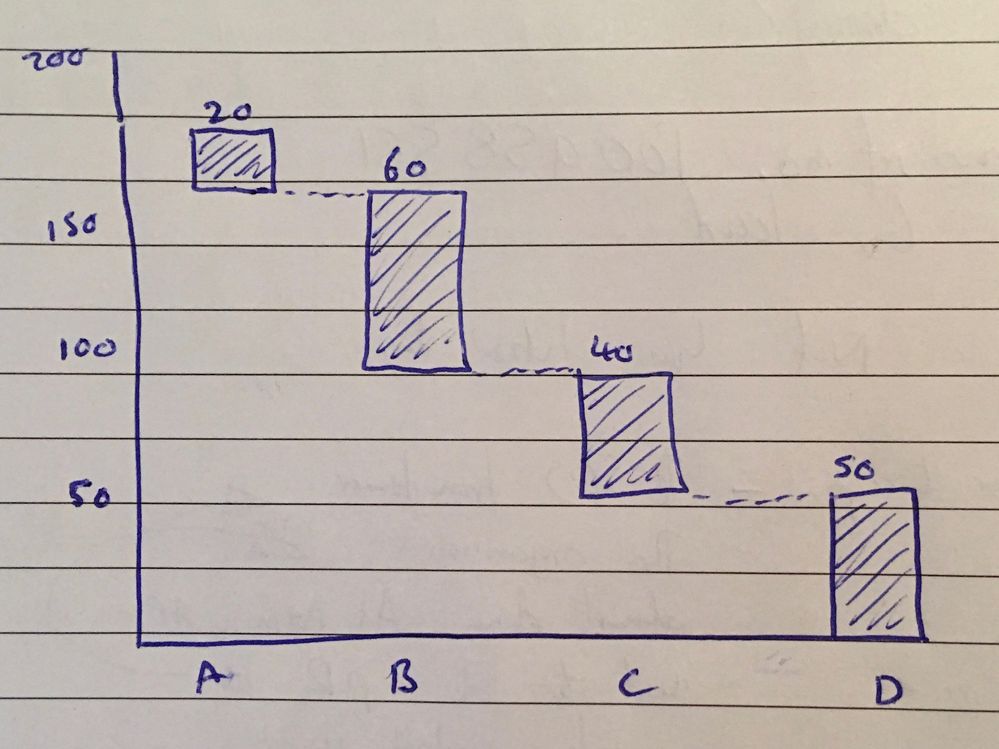
Is it possible to create a column chart that is stacked, but where each part of the stack still occupies its own column?
As Image below:
- Mark as New
- Bookmark Message
- Subscribe to Message
- Mute Message
- Subscribe to RSS Feed
- Permalink
- Report Inappropriate Content

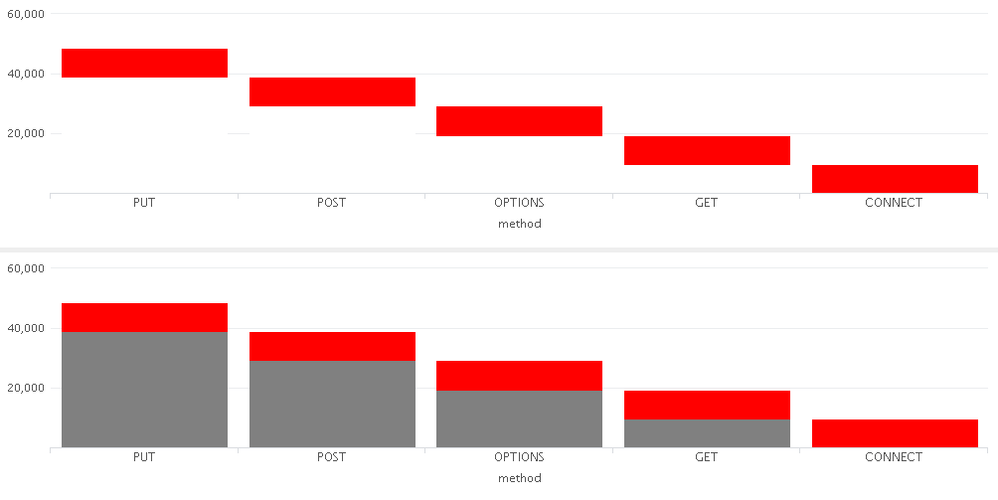
This is an idea.
Change the color of the bar
subtotal->White
<Search>
...|stats count by method|eval subtotal=count| accum subtotal|eval subtotal=subtotal-count|sort - method
<XML>
<option name="charting.legend.labels">[count,subtotal]</option>
<option name="charting.seriesColors">[0xFF0000,0xFFFFFF]</option>

- Mark as New
- Bookmark Message
- Subscribe to Message
- Mute Message
- Subscribe to RSS Feed
- Permalink
- Report Inappropriate Content

@tmortiboy, I have created Waterfall visualization using D3 and Splunk's Custom Visualization API. Please check it out whether it fits the need: https://splunkbase.splunk.com/app/3669/
PS: I currently have not implemented the following:
1) Tooltip (currently static label can be displayed)
2) Drilldown
3) Dynamic size (it is manual based on chart height/width right now)
4) Negative axis (can be implemented only after dynamic size is in place)
| makeresults | eval message= "Happy Splunking!!!"
- Mark as New
- Bookmark Message
- Subscribe to Message
- Mute Message
- Subscribe to RSS Feed
- Permalink
- Report Inappropriate Content

if you're comfortable creating a custom viz, you might be able to use this as a starter:
https://www.highcharts.com/demo/waterfall/grid-light
also this app has a waterfall viz, but the last supported version is 6.4
https://splunkbase.splunk.com/app/2856/
- Mark as New
- Bookmark Message
- Subscribe to Message
- Mute Message
- Subscribe to RSS Feed
- Permalink
- Report Inappropriate Content
This is an idea.
Change the color of the bar
subtotal->White
<Search>
...|stats count by method|eval subtotal=count| accum subtotal|eval subtotal=subtotal-count|sort - method
<XML>
<option name="charting.legend.labels">[count,subtotal]</option>
<option name="charting.seriesColors">[0xFF0000,0xFFFFFF]</option>
- Mark as New
- Bookmark Message
- Subscribe to Message
- Mute Message
- Subscribe to RSS Feed
- Permalink
- Report Inappropriate Content
I had thought of this, but the subtotals can still be hovered over, which is less than ideal.
Unless you know how you can disable the hover for this value?
- Mark as New
- Bookmark Message
- Subscribe to Message
- Mute Message
- Subscribe to RSS Feed
- Permalink
- Report Inappropriate Content
I ended up using this method, but it still feels a little hacky.

Join the Splunk Community Slack to learn, troubleshoot, and make connections with fellow Splunk practitioners in real time!
Join Splunk User Groups to connect and learn in-person by region or remotely by topic or industry.
Make Your Machine Data AI-Ready in Splunk
Splunk Asynchronous Forwarding Explained
How to Monitor AI Agents with Splunk Agent Observability
