
Join the Conversation
- Find Answers
- :
- Using Splunk
- :
- Splunk Search
- :
- Re: Duration of two events by status!
- Subscribe to RSS Feed
- Mark Topic as New
- Mark Topic as Read
- Float this Topic for Current User
- Bookmark Topic
- Subscribe to Topic
- Mute Topic
- Printer Friendly Page
- Mark as New
- Bookmark Message
- Subscribe to Message
- Mute Message
- Subscribe to RSS Feed
- Permalink
- Report Inappropriate Content

hi,
my raw data look like this:
12:01:11:000 ip: "123.456.789" = "1"
12:01:12:000 ip: "123.456.789" = "1"
12:01:13:000 ip: "123.456.789" = "1"
12:01:14:000 ip: "123.456.789" = "2"
12:01:15:000 ip: "123.456.789" = "2"
12:01:16:000 ip: "123.456.789" = "1"
12:01:17:000 ip: "123.456.789" = "1"
Now i want to calculate the duration only between the first event of "1" and "2". In other words, the duration when the ip shows the status "1". I tried some transaction and streamstats commands but nothing worked properly.
Thanks for your help!
- Mark as New
- Bookmark Message
- Subscribe to Message
- Mute Message
- Subscribe to RSS Feed
- Permalink
- Report Inappropriate Content

You could try with the transaction command:
index=<your_index> sourcetype=<your_sourcetype>
| transaction ip endswith=value=2
| eval keep=mvfilter(match(value, "1"))
| where keep=1
Assuming you are extracting the ip under field "ip" and values 1/2 under field "value"
- Mark as New
- Bookmark Message
- Subscribe to Message
- Mute Message
- Subscribe to RSS Feed
- Permalink
- Report Inappropriate Content

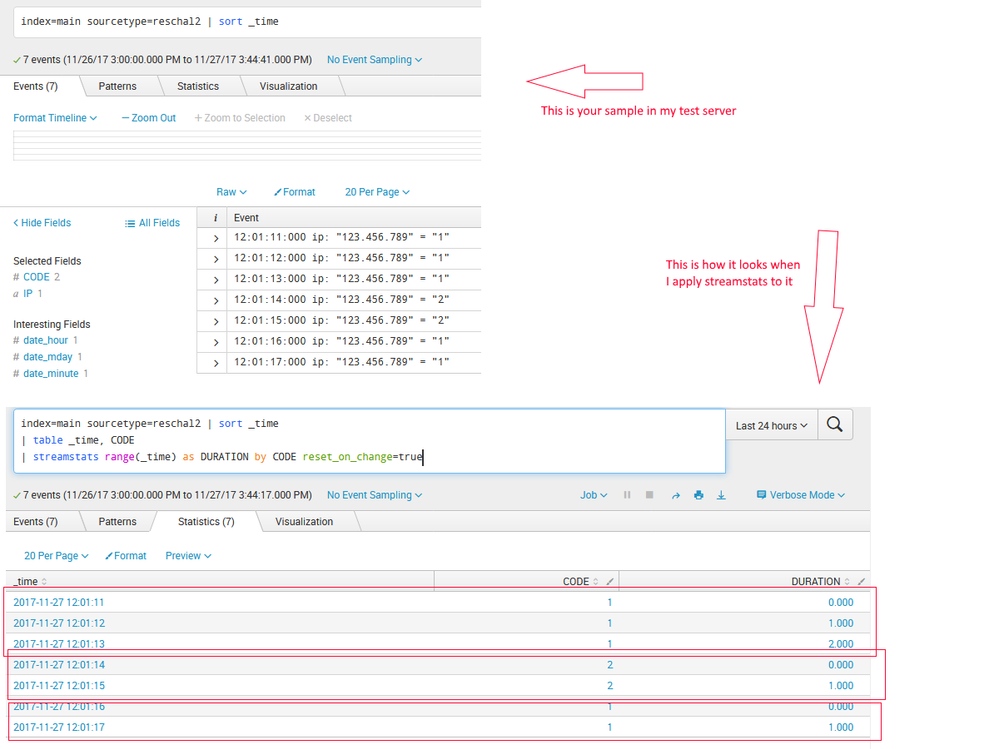
(I loaded your sample data into my test box then I did a field extraction for the IP and another for CODE.)
index=main sourcetype=reschal2 | sort _time
| table _time, CODE
| streamstats range(_time) as DURATION by CODE reset_on_change=true
Those commands will show you how long it was "1", then "2" then "1" again.
Here are some screenshots....
- Mark as New
- Bookmark Message
- Subscribe to Message
- Mute Message
- Subscribe to RSS Feed
- Permalink
- Report Inappropriate Content
Don't know why the screenshot isn't displaying and the site won't let me upload another. 😞
- Mark as New
- Bookmark Message
- Subscribe to Message
- Mute Message
- Subscribe to RSS Feed
- Permalink
- Report Inappropriate Content

I would change | sort _time to | sort 0 _time in order to avoid it to be truncated after 10K rows (default limit).
- Mark as New
- Bookmark Message
- Subscribe to Message
- Mute Message
- Subscribe to RSS Feed
- Permalink
- Report Inappropriate Content
You can probably do this by using reverse and dedup command. Are both ip and status an extracted fields? If yes, something like this would work.
your base search | reverse | dedup ip status | stats range(_time) by ip
- Mark as New
- Bookmark Message
- Subscribe to Message
- Mute Message
- Subscribe to RSS Feed
- Permalink
- Report Inappropriate Content
You could try with the transaction command:
index=<your_index> sourcetype=<your_sourcetype>
| transaction ip endswith=value=2
| eval keep=mvfilter(match(value, "1"))
| where keep=1
Assuming you are extracting the ip under field "ip" and values 1/2 under field "value"
- Mark as New
- Bookmark Message
- Subscribe to Message
- Mute Message
- Subscribe to RSS Feed
- Permalink
- Report Inappropriate Content
Thank you. Your answer works great. By adding
|table _time duration |eval duration=tostring(duration,"duration")| sort -_time
i get a proper solution!
- Mark as New
- Bookmark Message
- Subscribe to Message
- Mute Message
- Subscribe to RSS Feed
- Permalink
- Report Inappropriate Content
Yea, i forgot to mention duration would be stored under duration field, that's great you found it!
Thanks for accepting my answer and happy Splunking!

Join the Splunk Community Slack to learn, troubleshoot, and make connections with fellow Splunk practitioners in real time!
Join Splunk User Groups to connect and learn in-person by region or remotely by topic or industry.
[Puzzles] Solve, Learn, Repeat: Matching cron expressions
Design, Compete, Win: Submit Your Best Splunk Dashboards for a .conf26 Pass
May 2026 Splunk Expert Sessions: Security & Observability
