
Join the Conversation
- Find Answers
- :
- Using Splunk
- :
- Splunk Search
- :
- Display total count of unique values of a field?
- Subscribe to RSS Feed
- Mark Topic as New
- Mark Topic as Read
- Float this Topic for Current User
- Bookmark Topic
- Subscribe to Topic
- Mute Topic
- Printer Friendly Page
- Mark as New
- Bookmark Message
- Subscribe to Message
- Mute Message
- Subscribe to RSS Feed
- Permalink
- Report Inappropriate Content

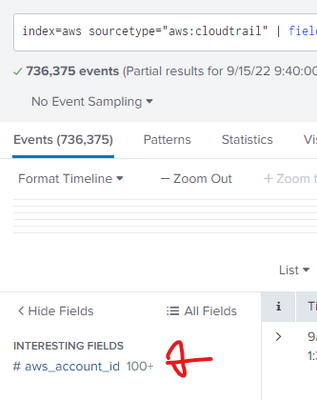
Hi, Fundamentals question but one of those brain teasers. How do i get a total count of distinct values of a field ? For example, as shown below Splunk shows my "aws_account_id" field has 100+ unique values. What is that exact 100+ number ? If i hover my mouse on the field, it shows Top 10 values etc. but not the total count.
Things i have tried as per other posts in the forum"
index=aws sourcetype="aws:cloudtrail" | fields aws_account_id
| stats dc(count) by aws_account_id
This does show me the total count (which is 156) but it shows like this:

Instead i want the data in this tabular format:
| Fieldname | Count |
| aws_account_id | 156 |
Thanks in advance
- Mark as New
- Bookmark Message
- Subscribe to Message
- Mute Message
- Subscribe to RSS Feed
- Permalink
- Report Inappropriate Content


Hi @neerajs_81,
to know how many different aws_account_id you have (result is a number) , you have to use the dc option in stats command:
index=aws sourcetype="aws:cloudtrail"
| stats dc(aws_account_id) AS aws_account_id_count
Ciao.
Giuseppe
- Mark as New
- Bookmark Message
- Subscribe to Message
- Mute Message
- Subscribe to RSS Feed
- Permalink
- Report Inappropriate Content

Hi
that 100+ is not an exact number. It just show that this field have more than 100 different values (as you have count it is 156 in your case). One way to get your wanted output is
index=aws sourcetype="aws:cloudtrail"
| fields aws_account_id
| stats dc(count) as Count
| eval Fieldname = "aws_account_id"
| table Fieldname Count
r. Ismo
- Mark as New
- Bookmark Message
- Subscribe to Message
- Mute Message
- Subscribe to RSS Feed
- Permalink
- Report Inappropriate Content
- Mark as New
- Bookmark Message
- Subscribe to Message
- Mute Message
- Subscribe to RSS Feed
- Permalink
- Report Inappropriate Content
Hi @neerajs_81,
to know how many different aws_account_id you have (result is a number) , you have to use the dc option in stats command:
index=aws sourcetype="aws:cloudtrail"
| stats dc(aws_account_id) AS aws_account_id_count
Ciao.
Giuseppe
- Mark as New
- Bookmark Message
- Subscribe to Message
- Mute Message
- Subscribe to RSS Feed
- Permalink
- Report Inappropriate Content
Hi @neerajs_81,
good for you, see next time!
Ciao and happy splunking
Giuseppe
P.S.: Karma Points are appreciated by all the contributors 😉

Unlock Faster Time-to-Value on Edge and Ingest Processor with New SPL2 Pipeline ...
Splunk MCP & Agentic AI: Machine Data Without Limits
Application management with Targeted Application Install for Victoria Experience
