
Join the Conversation
- Find Answers
- :
- Using Splunk
- :
- Splunk Search
- :
- Re: Display all values at time when hoovering over...
- Subscribe to RSS Feed
- Mark Topic as New
- Mark Topic as Read
- Float this Topic for Current User
- Bookmark Topic
- Subscribe to Topic
- Mute Topic
- Printer Friendly Page
- Mark as New
- Bookmark Message
- Subscribe to Message
- Mute Message
- Subscribe to RSS Feed
- Permalink
- Report Inappropriate Content
Display all values at time when hoovering over timechart

I have a timechart with multiple values/graphs.
When hoovering my mouse over the timechart I can only see one value at the time in the tooltip. (see pictures)
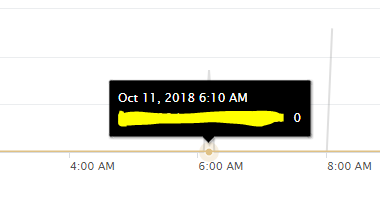
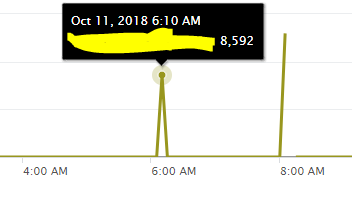
Is it possible to display all values at a certain time when hoovering over?
eks: at 6.10 AM I have two datapoints (8,592 and 0), so when the mouse is positioned at 6.10 AM I want both those values displayed.


- Mark as New
- Bookmark Message
- Subscribe to Message
- Mute Message
- Subscribe to RSS Feed
- Permalink
- Report Inappropriate Content
Please check this previous link on similar issue, see if this helps :
https://answers.splunk.com/answers/637224/how-to-display-multiple-data-points-when-hovering-1.html
- Mark as New
- Bookmark Message
- Subscribe to Message
- Mute Message
- Subscribe to RSS Feed
- Permalink
- Report Inappropriate Content
unfortunately the answer in that link does not solve the issue I am asking, it does provide an optional solution, but that doesent show multiple data datapoints at the same time.
- Mark as New
- Bookmark Message
- Subscribe to Message
- Mute Message
- Subscribe to RSS Feed
- Permalink
- Report Inappropriate Content
with the optional solution of using column charts, you can use the stacked chart with scale set to use "log " instead of linear..
- Mark as New
- Bookmark Message
- Subscribe to Message
- Mute Message
- Subscribe to RSS Feed
- Permalink
- Report Inappropriate Content
I have looked in to that, but it can be as much as 15 different values and that wont look good. Also this is a request from an client so this is not the way I want to solve it. Do you know if my initial question is even possible?

Splunk Search APIを使えば調査過程が残せます
Integrating Splunk Search API and Quarto to Create Reproducible Investigation ...
Congratulations to the 2025-2026 SplunkTrust!
