
Join the Conversation
- Find Answers
- :
- Using Splunk
- :
- Splunk Search
- :
- Detect Start-of-Week & Weekly aggregations
- Subscribe to RSS Feed
- Mark Topic as New
- Mark Topic as Read
- Float this Topic for Current User
- Bookmark Topic
- Subscribe to Topic
- Mute Topic
- Printer Friendly Page
- Mark as New
- Bookmark Message
- Subscribe to Message
- Mute Message
- Subscribe to RSS Feed
- Permalink
- Report Inappropriate Content
Detect Start-of-Week & Weekly aggregations

Hello splunkers,
We have to calculate some KPIs, on time-series data, aggregated by multiple factors, with time being the most important one.
The most common time aggregations for us are monthly and weekly.
Scenario: Calculate the weekly trend of a KPI for the month of May 2018 [ref image attached]
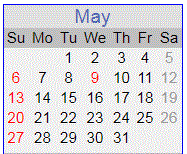
How one would normally do it would be [assume week start on Sunday]:
Week Date
1: 1 - 5
2: 6 - 12
3: 13 - 19
4: 20 - 26
5: 27 - 31
Thus there will be 5 data points.
How do I implement this in Splunk?
The way I figured out to do it now is use "bin span=1w _time", but it does not detect the week start.
However, this approach plainly takes 7 days from the 1st of the month and the result is that we have skewed weeks leading to misleading KPI values.
- Mark as New
- Bookmark Message
- Subscribe to Message
- Mute Message
- Subscribe to RSS Feed
- Permalink
- Report Inappropriate Content
One way I figured out how to do this is using:
| eval Week = strftime(strptime(_time, "%Y-%m-%d %H:%M:%S.%N"), "%V")
strptime converts the _time [formatted in "%Y-%m-%d %H:%M:%S.%N"] to Unix epoch time. Then strftime extracts the week of year from the epoch time using "%V"
The variable %V is not mentioned in the documentation.
However, how do I declare custom weeks, if the business requirements are as such?



Join the Splunk Community Slack to learn, troubleshoot, and make connections with fellow Splunk practitioners in real time!
Join Splunk User Groups to connect and learn in-person by region or remotely by topic or industry.
Event Series: The Agentic SOC: Trust Before Autonomy
Free Professional Services for .conf26 Attendees
Defend at Machine Speed: Your Guide to Security Sessions at .conf26
