
Join the Conversation
- Find Answers
- :
- Using Splunk
- :
- Splunk Search
- :
- Re: Dashboard Title - Display date as DD/MM/YYYY
- Subscribe to RSS Feed
- Mark Topic as New
- Mark Topic as Read
- Float this Topic for Current User
- Bookmark Topic
- Subscribe to Topic
- Mute Topic
- Printer Friendly Page
- Mark as New
- Bookmark Message
- Subscribe to Message
- Mute Message
- Subscribe to RSS Feed
- Permalink
- Report Inappropriate Content
Dashboard Title - Display date as DD/MM/YYYY

Hello there,
idk how to display the date in the title of the dashboard format as DD/MM/YYYY, not in epoch format
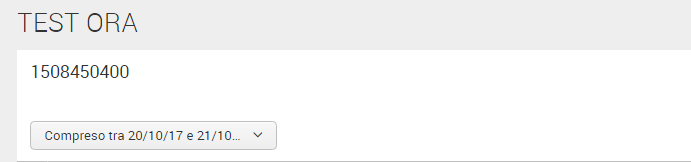
Here it is the source code:
<form>
  <label>TEST ORA</label>
  <fieldset submitButton="false"></fieldset>
  <row>
    <panel>
      <title>$field1.earliest$</title>
      <input type="time" token="field1">
        <label></label>
        <default>
          <earliest>1508450400</earliest>
          <latest>1508623200</latest>
        </default>
      </input>
      <event>
        <search>
          <query>index=test "CURRENT LOGGED USER"</query>
          <earliest>$field1.earliest$</earliest>
          <latest>$field1.latest$</latest>
          <sampleRatio>1</sampleRatio>
        </search>
        <option name="count">50</option>
        <option name="list.drilldown">none</option>
        <option name="list.wrap">1</option>
        <option name="maxLines">5</option>
        <option name="raw.drilldown">full</option>
        <option name="rowNumbers">0</option>
        <option name="table.drilldown">all</option>
        <option name="table.sortDirection">asc</option>
        <option name="table.wrap">1</option>
        <option name="type">list</option>
      </event>
    </panel>
  </row>
</form>
Can someone help me?
TNX 🙂

- Mark as New
- Bookmark Message
- Subscribe to Message
- Mute Message
- Subscribe to RSS Feed
- Permalink
- Report Inappropriate Content

@marziaolla, were you able to try out any of the answers provided below?
| makeresults | eval message= "Happy Splunking!!!"
- Mark as New
- Bookmark Message
- Subscribe to Message
- Mute Message
- Subscribe to RSS Feed
- Permalink
- Report Inappropriate Content
@marziaolla, as @cmerriman has pointed out addinfo command is one of the ways to add Search Job Earliest Time and Latest Time. Other option would be to use default tokens for Job which can be accessed in search event handlers. Refer to one of my answers which illustrates both examples. You can use the toking for String Time to display time in String format of your choice(using strftime()) instead of epoch time.
https://answers.splunk.com/answers/578984/running-one-of-two-searches-based-on-time-picker-s.html
| makeresults | eval message= "Happy Splunking!!!"
- Mark as New
- Bookmark Message
- Subscribe to Message
- Mute Message
- Subscribe to RSS Feed
- Permalink
- Report Inappropriate Content

try doing this:
<form>
   <label>TEST ORA</label>
   <fieldset submitButton="false"></fieldset>
   <row>
     <panel>
       <title>$timelabel$</title>
       <input type="time" token="field1">
         <label></label>
         <default>
           <earliest>1508450400</earliest>
           <latest>1508623200</latest>
         </default>
       </input>
<search>
    <query>|makeresults|addinfo</query>
    <earliest>$field1.earliest$</earliest>
    <latest>$field1.latest$</latest>
          <progress>
            <eval token="timelabel">strftime($result.info_min_time$,"%d/%m/%Y")</eval>
          </progress>
  </search>
       <event>
         <search>
           <query>index=test "CURRENT LOGGED USER"</query>
           <earliest>$field1.earliest$</earliest>
           <latest>$field1.latest$</latest>
           <sampleRatio>1</sampleRatio>
         </search>
         <option name="count">50</option>
         <option name="list.drilldown">none</option>
         <option name="list.wrap">1</option>
         <option name="maxLines">5</option>
         <option name="raw.drilldown">full</option>
         <option name="rowNumbers">0</option>
         <option name="table.drilldown">all</option>
         <option name="table.sortDirection">asc</option>
         <option name="table.wrap">1</option>
         <option name="type">list</option>
       </event>
     </panel>
   </row>
 </form>

Join the Splunk Community Slack to learn, troubleshoot, and make connections with fellow Splunk practitioners in real time!
Join Splunk User Groups to connect and learn in-person by region or remotely by topic or industry.
[Puzzles] Solve, Learn, Repeat: Matching cron expressions
Design, Compete, Win: Submit Your Best Splunk Dashboards for a .conf26 Pass
May 2026 Splunk Expert Sessions: Security & Observability
