
Join the Conversation
- Find Answers
- :
- Using Splunk
- :
- Splunk Search
- :
- Re: Count table value pair
- Subscribe to RSS Feed
- Mark Topic as New
- Mark Topic as Read
- Float this Topic for Current User
- Bookmark Topic
- Subscribe to Topic
- Mute Topic
- Printer Friendly Page
- Mark as New
- Bookmark Message
- Subscribe to Message
- Mute Message
- Subscribe to RSS Feed
- Permalink
- Report Inappropriate Content

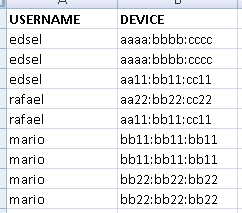
I have a table like this derive from search
I need to have it formatted like this. Like counting the username-device pair occurance
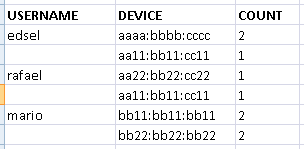
Also, how do call this kind of table (field value pair?).. just so next time i know what to search
- Mark as New
- Bookmark Message
- Subscribe to Message
- Mute Message
- Subscribe to RSS Feed
- Permalink
- Report Inappropriate Content

try something like this:
...| stats count by USERNAME, DEVICE|eval deviceCount=DEVICE+" - "+count | stats list(deviceCount) as deviceCount by USERNAME|rex field=deviceCount "(?<DEVICE>.*) - (?<COUNT>.*)"|fields - deviceCount
- Mark as New
- Bookmark Message
- Subscribe to Message
- Mute Message
- Subscribe to RSS Feed
- Permalink
- Report Inappropriate Content
- Mark as New
- Bookmark Message
- Subscribe to Message
- Mute Message
- Subscribe to RSS Feed
- Permalink
- Report Inappropriate Content
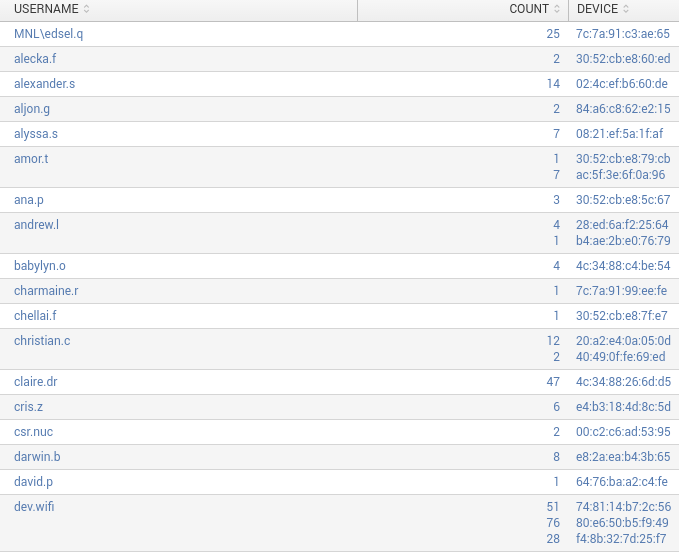
This one did it
...| stats count by USERNAME, DEVICE|eval deviceCount=DEVICE+" - "+count | stats list(deviceCount) as deviceCount by USERNAME|rex field=deviceCount "(?<DEVICE>.*) - (?<COUNT>.*)"|fields - deviceCount
- Mark as New
- Bookmark Message
- Subscribe to Message
- Mute Message
- Subscribe to RSS Feed
- Permalink
- Report Inappropriate Content
try something like this:
...| stats count by USERNAME, DEVICE|eval deviceCount=DEVICE+" - "+count | stats list(deviceCount) as deviceCount by USERNAME|rex field=deviceCount "(?<DEVICE>.*) - (?<COUNT>.*)"|fields - deviceCount
- Mark as New
- Bookmark Message
- Subscribe to Message
- Mute Message
- Subscribe to RSS Feed
- Permalink
- Report Inappropriate Content


Hi splunkmata,
Please try the following search commands following the search string that produced your table:
... | stats count by USERNAME, DEVICE | stats list(DEVICE) as DEVICE, list(count) as count
Hope this helps. Thanks!
Hunter
- Mark as New
- Bookmark Message
- Subscribe to Message
- Mute Message
- Subscribe to RSS Feed
- Permalink
- Report Inappropriate Content
Sorry, correction - missing by DEVICE at the end:
... | stats count by USERNAME, DEVICE | stats list(DEVICE) as DEVICE, list(count) as count by DEVICE
Thanks!
Hunter
- Mark as New
- Bookmark Message
- Subscribe to Message
- Mute Message
- Subscribe to RSS Feed
- Permalink
- Report Inappropriate Content
Hi hunter,
thanks for the input.
got this error when i pipe your stat to my query
Error in 'stats' command: The output field 'DEVICE' cannot have the same name as a group-by field.




Join the Splunk Community Slack to learn, troubleshoot, and make connections with fellow Splunk practitioners in real time!
Join Splunk User Groups to connect and learn in-person by region or remotely by topic or industry.
Painting a Clearer Picture: Unifying Your Investigations with Cisco AI Canvas
Hello POJO, meet nocode
Announcing Modern Navigation: A New Era of Splunk User Experience
