
Join the Conversation
- Find Answers
- :
- Using Splunk
- :
- Splunk Search
- :
- Re: Count events matching a specific string
- Subscribe to RSS Feed
- Mark Topic as New
- Mark Topic as Read
- Float this Topic for Current User
- Bookmark Topic
- Subscribe to Topic
- Mute Topic
- Printer Friendly Page
- Mark as New
- Bookmark Message
- Subscribe to Message
- Mute Message
- Subscribe to RSS Feed
- Permalink
- Report Inappropriate Content
Count events matching a specific string

From the logs, I need to get the count of events from the below msg field value which matches factType=COMMERCIAL and has filters.
secondly, extract the filter type used, like in the example below id and extract the string sorts={"sortOrders":[{"key":"id","order":"DESC"}]}.
Using the Splunk query with basic wildcard does not work efficiently. Could you please assist
cf_space_name=prod msg="*/facts?factType=COMMERCIAL&sourceSystem=ADMIN&sourceOwner=ABC&filters=*"
msg: abc.asia - [2021-08-23T00:27:08.152+0000] "GET /facts?factType=COMMERCIAL&sourceSystem=ADMIN&sourceOwner=ABC&filters=%257B%2522stringMatchFilters%2522:%255B%257B%2522key%2522:%2522BFEESCE((json_data-%253E%253E'isNotSearchable')::boolean,%2520false)%2522,%2522value%2522:%2522false%2522,%2522operator%2522:%2522EQ%2522%257D%255D,%2522multiStringMatchFilters%2522:%255B%257B%2522key%2522:%2522json_data-%253E%253E'id'%2522,%2522values%2522:%255B%25224970111%2522%255D%257D%255D,%2522containmentFilters%2522:%255B%255D,%2522nestedMultiStringMatchFilter%2522:%255B%255D,%2522nestedStringMatchFilters%2522:%255B%255D%257D&sorts=%257B%2522sortOrders%2522:%255B%257B%2522key%2522:%2522id%2522,%2522order%2522:%2522DESC%2522%257D%255D%257D&pagination=null
Thanks in advance.
- Mark as New
- Bookmark Message
- Subscribe to Message
- Mute Message
- Subscribe to RSS Feed
- Permalink
- Report Inappropriate Content


Just extract the appropriate fields from the URI and split the parameters into a multivalued field.
| makeresults
| eval _raw="msg: abc.asia - [2021-08-23T00:27:08.152+0000] \"GET /facts?factType=COMMERCIAL&sourceSystem=ADMIN&sourceOwner=ABC&filters=%257B%2522stringMatchFilters%2522:%255B%257B%2522key%2522:%2522BFEESCE((json_data-%253E%253E'isNotSearchable')::boolean,%2520false)%2522,%2522value%2522:%2522false%2522,%2522operator%2522:%2522EQ%2522%257D%255D,%2522multiStringMatchFilters%2522:%255B%257B%2522key%2522:%2522json_data-%253E%253E'id'%2522,%2522values%2522:%255B%25224970111%2522%255D%257D%255D,%2522containmentFilters%2522:%255B%255D,%2522nestedMultiStringMatchFilter%2522:%255B%255D,%2522nestedStringMatchFilters%2522:%255B%255D%257D&sorts=%257B%2522sortOrders%2522:%255B%257B%2522key%2522:%2522id%2522,%2522order%2522:%2522DESC%2522%257D%255D%257D&pagination=null\""
| rex "\"(?<req>\S+)\s(?<uri>\S+)\""
| eval uri=urldecode(uri)
| rex field=uri "(?<reqpath>.*)\?(?<query>.*)"
| makemv delim="&" query
| search query="factType=COMMERCIAL"
Then you can extract the "filters=something" value from the query field and process it apropriately (probably passing it through another urldecode()).
- Mark as New
- Bookmark Message
- Subscribe to Message
- Mute Message
- Subscribe to RSS Feed
- Permalink
- Report Inappropriate Content

NOTE: AS I FOUND SOME VALUES ARE DOUBLE ENCODED HENCE USED urldecode TWICE.
Can you please try this?
YOUR_SEARCH
| eval _raw = replace(_raw , "%25","%"),_raw = replace(_raw , "%25","%"),_raw = replace(_raw , "%22","\"")
,_raw = replace(_raw , "%5B","["),_raw = replace(_raw , "%5D","]")
,_raw = replace(_raw , "%7B","{"),_raw = replace(_raw , "%7D","}") | extract
| search factType="COMMERCIAL"
| table factType sorts
|rex field=sorts "\"key\":\"(?<key>[^\"]+)\",\"order\":\"(?<order>[^\"]+)\""
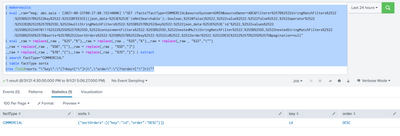
My Sample Search :
| makeresults
| eval _raw="msg: abc.asia - [2021-08-23T00:27:08.152+0000] \"GET /facts?factType=COMMERCIAL&sourceSystem=ADMIN&sourceOwner=ABC&filters=%257B%2522stringMatchFilters%2522:%255B%257B%2522key%2522:%2522BFEESCE((json_data-%253E%253E'isNotSearchable')::boolean,%2520false)%2522,%2522value%2522:%2522false%2522,%2522operator%2522:%2522EQ%2522%257D%255D,%2522multiStringMatchFilters%2522:%255B%257B%2522key%2522:%2522json_data-%253E%253E'id'%2522,%2522values%2522:%255B%25224970111%2522%255D%257D%255D,%2522containmentFilters%2522:%255B%255D,%2522nestedMultiStringMatchFilter%2522:%255B%255D,%2522nestedStringMatchFilters%2522:%255B%255D%257D&sorts=%257B%2522sortOrders%2522:%255B%257B%2522key%2522:%2522id%2522,%2522order%2522:%2522DESC%2522%257D%255D%257D&pagination=null"
| eval _raw = replace(_raw , "%25","%"),_raw = replace(_raw , "%25","%"),_raw = replace(_raw , "%22","\"")
,_raw = replace(_raw , "%5B","["),_raw = replace(_raw , "%5D","]")
,_raw = replace(_raw , "%7B","{"),_raw = replace(_raw , "%7D","}") | extract
| search factType="COMMERCIAL"
| table factType sorts
|rex field=sorts "\"key\":\"(?<key>[^\"]+)\",\"order\":\"(?<order>[^\"]+)\""
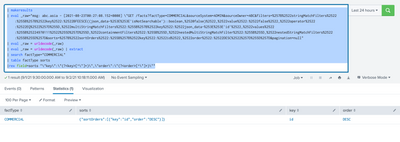
UPDATED ANSWER.
YOUR_SEARCH
| eval _raw = urldecode(_raw)
| eval _raw = urldecode(_raw) | extract
| search factType="COMMERCIAL"
| table factType sorts
|rex field=sorts "\"key\":\"(?<key>[^\"]+)\",\"order\":\"(?<order>[^\"]+)\""
| makeresults
| eval _raw="msg: abc.asia - [2021-08-23T00:27:08.152+0000] \"GET /facts?factType=COMMERCIAL&sourceSystem=ADMIN&sourceOwner=ABC&filters=%257B%2522stringMatchFilters%2522:%255B%257B%2522key%2522:%2522BFEESCE((json_data-%253E%253E'isNotSearchable')::boolean,%2520false)%2522,%2522value%2522:%2522false%2522,%2522operator%2522:%2522EQ%2522%257D%255D,%2522multiStringMatchFilters%2522:%255B%257B%2522key%2522:%2522json_data-%253E%253E'id'%2522,%2522values%2522:%255B%25224970111%2522%255D%257D%255D,%2522containmentFilters%2522:%255B%255D,%2522nestedMultiStringMatchFilter%2522:%255B%255D,%2522nestedStringMatchFilters%2522:%255B%255D%257D&sorts=%257B%2522sortOrders%2522:%255B%257B%2522key%2522:%2522id%2522,%2522order%2522:%2522DESC%2522%257D%255D%257D&pagination=null"
| eval _raw = urldecode(_raw)
| eval _raw = urldecode(_raw) | extract
| search factType="COMMERCIAL"
| table factType sorts
|rex field=sorts "\"key\":\"(?<key>[^\"]+)\",\"order\":\"(?<order>[^\"]+)\""
Thanks
KV
▄︻̷̿┻̿═━一
If any of my reply helps you to solve the problem Or gain knowledge, an upvote would be appreciated.


Join the Splunk Community Slack to learn, troubleshoot, and make connections with fellow Splunk practitioners in real time!
Join Splunk User Groups to connect and learn in-person by region or remotely by topic or industry.
Agentic SOC Triage: Investigating Splunk ES Notables with MCP Server and a Local LLM
All Work and No Play? Not at .conf26! Unwind at These Evening Events
Join the Hackathon at .conf26 and build a No-Code AI agent
