
Join the Conversation
- Find Answers
- :
- Using Splunk
- :
- Splunk Search
- :
- Re: Connecting Tableau to Splunk
- Subscribe to RSS Feed
- Mark Topic as New
- Mark Topic as Read
- Float this Topic for Current User
- Bookmark Topic
- Subscribe to Topic
- Mute Topic
- Printer Friendly Page
- Mark as New
- Bookmark Message
- Subscribe to Message
- Mute Message
- Subscribe to RSS Feed
- Permalink
- Report Inappropriate Content
Connecting Tableau to Splunk

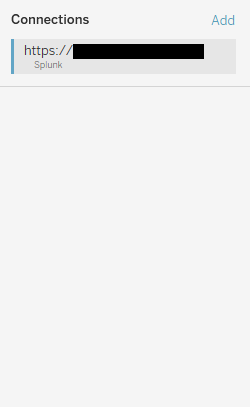
I am trying to connect Tableau to a Splunk instance. I know almost nothing about Splunk and am hoping some folks have had experience with this. My understanding, from the documentation, is that we have to first create some saved searches in Splunk. I've done that. My expectation was that, when I connect to Splunk in Tableau, it should then show me those saved searches as "tables". But when I connect, it just shows a blank screen. Any idea what I'm doing wrong?
- Mark as New
- Bookmark Message
- Subscribe to Message
- Mute Message
- Subscribe to RSS Feed
- Permalink
- Report Inappropriate Content

Two things to start:
Make sure your user has access to the saved searches
Tableau only understands table-formatted search results, not visualizations.
- Mark as New
- Bookmark Message
- Subscribe to Message
- Mute Message
- Subscribe to RSS Feed
- Permalink
- Report Inappropriate Content
Thanks for the quick response! I actually created the saved search myself (with my own login) then used that same login for Tableau, so I'd assume I have access (I also fiddled with the security to make it available to more than just me). And the saved search was just a very simple table of columnar data.
- Mark as New
- Bookmark Message
- Subscribe to Message
- Mute Message
- Subscribe to RSS Feed
- Permalink
- Report Inappropriate Content
And you're not getting any connection errors? It's been a while, but I recall the ODBC driver choking on Splunk messages (not errors, not relevant, but apparently show-stopping). Do you see your Tableau activity in _internal?
- Mark as New
- Bookmark Message
- Subscribe to Message
- Mute Message
- Subscribe to RSS Feed
- Permalink
- Report Inappropriate Content
No, it appears to connect without issue. No errors.
Not sure what you mean by seeing Tableau activity in _internal (sorry--I'm a Tableau guy and don't know much about Splunk).
- Mark as New
- Bookmark Message
- Subscribe to Message
- Mute Message
- Subscribe to RSS Feed
- Permalink
- Report Inappropriate Content
I was able to work with one of my Tableau users today, and found something interesting. Tables aren't showing up for him, either, but he's able to use the browse function (top-right of the page) to find them. See anything using that route?
Sidenote: We have a convention of prepending these report names with "Exportable Data - " to differentiate reports intended for Tableau use from those that may not work in Tableau.
- Mark as New
- Bookmark Message
- Subscribe to Message
- Mute Message
- Subscribe to RSS Feed
- Permalink
- Report Inappropriate Content
I'm not seeing a browse button.
Is there a way to attach a screenshot here? If so I can show you what I see.
- Mark as New
- Bookmark Message
- Subscribe to Message
- Mute Message
- Subscribe to RSS Feed
- Permalink
- Report Inappropriate Content

@flerlagekr Ken did you ever figure this out? I'm looking to connect to splunk data for the first time in Tableau as well. Thanks!



Join the Splunk Community Slack to learn, troubleshoot, and make connections with fellow Splunk practitioners in real time!
Join Splunk User Groups to connect and learn in-person by region or remotely by topic or industry.
Quick connection discovery mode for forwarders
Build and Launch AI Agents from Your Splunk Workflows
Splunk Cloud Application Management in Terraform
