
Join the Conversation
- Find Answers
- :
- Using Splunk
- :
- Splunk Search
- :
- Re: Combine stats count results
- Subscribe to RSS Feed
- Mark Topic as New
- Mark Topic as Read
- Float this Topic for Current User
- Bookmark Topic
- Subscribe to Topic
- Mute Topic
- Printer Friendly Page
- Mark as New
- Bookmark Message
- Subscribe to Message
- Mute Message
- Subscribe to RSS Feed
- Permalink
- Report Inappropriate Content

Hello all,
I feel kind of dumb even asking this question, but I've been up and down these forums looking for an answer and I just can't seem to figure this out. I have a stats count query that it showing results, and I'm trying to combine two of the results.
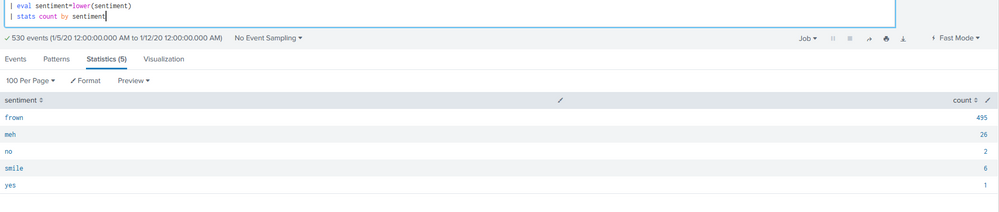
So in the picture above you can see "frown" has a count value, but in my case "no" is the same thing as "frown" and "smile" is also the same thing as "yes" so I'm trying to combine those values so the results look like this:
Sentiment Count
Bad 497
Good 7
Meh 26
I know I'll probably have to do some eval statement to combine the two but I just can't seem to figure it out! Any help would be very appreciated!
- Mark as New
- Bookmark Message
- Subscribe to Message
- Mute Message
- Subscribe to RSS Feed
- Permalink
- Report Inappropriate Content
Of course... Right when I ask the question I figure out the answer. For anyone else who runs into this, I used the below link to find my solution:
https://answers.splunk.com/answers/751141/combine-add-rows-in-the-search-results-using-a-wid.html
The line I added to my query was:
| eval Total=case(like(lower(sentiment),"frown"),"Bad", like(lower(sentiment),"no"),"Bad", like(lower(sentiment),"smile"),"Good", like(lower(sentiment),"yes"),"Good", like(lower(sentiment),"meh"),"Meh"),1=1,Total)
| stats count by Total
- Mark as New
- Bookmark Message
- Subscribe to Message
- Mute Message
- Subscribe to RSS Feed
- Permalink
- Report Inappropriate Content
Of course... Right when I ask the question I figure out the answer. For anyone else who runs into this, I used the below link to find my solution:
https://answers.splunk.com/answers/751141/combine-add-rows-in-the-search-results-using-a-wid.html
The line I added to my query was:
| eval Total=case(like(lower(sentiment),"frown"),"Bad", like(lower(sentiment),"no"),"Bad", like(lower(sentiment),"smile"),"Good", like(lower(sentiment),"yes"),"Good", like(lower(sentiment),"meh"),"Meh"),1=1,Total)
| stats count by Total
- Mark as New
- Bookmark Message
- Subscribe to Message
- Mute Message
- Subscribe to RSS Feed
- Permalink
- Report Inappropriate Content

You can further group like this, with line breaks for readability:
| eval Total=case(like(lower(sentiment),"frown") OR like(lower(sentiment),"no"),"Bad",
like(lower(sentiment),"smile") OR like(lower(sentiment),"yes"),"Good",
like(lower(sentiment),"meh"),"Meh",
1==1,Total)
| stats count by Total



Join the Splunk Community Slack to learn, troubleshoot, and make connections with fellow Splunk practitioners in real time!
Join Splunk User Groups to connect and learn in-person by region or remotely by topic or industry.
Data Management Digest – September 2026
Federated Search for CloudWatch Unified Data Store Is Generally Available
Announcing Modern Navigation: A New Era of Splunk User Experience
