
Join the Conversation
- Find Answers
- :
- Using Splunk
- :
- Splunk Search
- :
- Re: Chart
- Subscribe to RSS Feed
- Mark Topic as New
- Mark Topic as Read
- Float this Topic for Current User
- Bookmark Topic
- Subscribe to Topic
- Mute Topic
- Printer Friendly Page
- Mark as New
- Bookmark Message
- Subscribe to Message
- Mute Message
- Subscribe to RSS Feed
- Permalink
- Report Inappropriate Content

My boss has asked me to create a chart that shows the number of fired alerts (y-axis) by day of the month (x-axis). I suggested we do this as a stacked chart with each alert represented by a different color. I know the alert variable is "ss_name" and i found this expression to create the "date":
convert timeformat="%m-%d" ctime(_time) AS date
I just cant get the correct syntax to get all 3 elements in to the chart. So far i have this:
index=_audit action="alert_fired" | convert timeformat="%m-%d" ctime(_time) AS date | timechart date by ss_name
Thanks!
- Mark as New
- Bookmark Message
- Subscribe to Message
- Mute Message
- Subscribe to RSS Feed
- Permalink
- Report Inappropriate Content


- Mark as New
- Bookmark Message
- Subscribe to Message
- Mute Message
- Subscribe to RSS Feed
- Permalink
- Report Inappropriate Content
How about something like
index=_audit action="alert_fired" | convert timeformat="%m-%d" ctime(_time) AS date | stats count by ss_name, dateThen use a stacked bar chart in your dashboard panel
- Mark as New
- Bookmark Message
- Subscribe to Message
- Mute Message
- Subscribe to RSS Feed
- Permalink
- Report Inappropriate Content
i had tried that one already but it puts count and date as the only x-axis items instead of the ss_name (alerts)
- Mark as New
- Bookmark Message
- Subscribe to Message
- Mute Message
- Subscribe to RSS Feed
- Permalink
- Report Inappropriate Content
Try adding
| xyseries date, ss_name, count- Mark as New
- Bookmark Message
- Subscribe to Message
- Mute Message
- Subscribe to RSS Feed
- Permalink
- Report Inappropriate Content
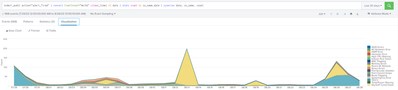
- Mark as New
- Bookmark Message
- Subscribe to Message
- Mute Message
- Subscribe to RSS Feed
- Permalink
- Report Inappropriate Content
perfect! thanks!
- Mark as New
- Bookmark Message
- Subscribe to Message
- Mute Message
- Subscribe to RSS Feed
- Permalink
- Report Inappropriate Content

Hi @mvasquez21,
why do you want to complicate the search?
timechart is sufficient for your need:
index=_audit action="alert_fired" earliest=-30d@d latest=@d
| timechart span=1d count
if you want to know how many alerts you fired for each kind of alert, you could run something like this:
index=_audit action="alert_fired" earliest=-30d@d latest=@d
| timechart span=1d count BY ss_name
but it depends on the number of different alerts: if they are too many your chart isn't readable.
The problem is that you want to run a search on a long time (one month) and, if you have many events, this is a very slow search.
So you could schedule this search as a report by night and display it very quickly or schedule a search saving results in a summary index and running the search on the summary index.
Ciao.
Giuseppe

Join the Splunk Community Slack to learn, troubleshoot, and make connections with fellow Splunk practitioners in real time!
Join Splunk User Groups to connect and learn in-person by region or remotely by topic or industry.
Meet the .conf26 AI Agent Buildathon Winners
Trusted Autonomy in the SOC: A Maturity Journey
Supercharging Windows Security Detection Performance: Introducing Hybrid Field ...
