
Join the Conversation
- Find Answers
- :
- Using Splunk
- :
- Splunk Search
- :
- Calculating Percentage
- Subscribe to RSS Feed
- Mark Topic as New
- Mark Topic as Read
- Float this Topic for Current User
- Bookmark Topic
- Subscribe to Topic
- Mute Topic
- Printer Friendly Page
- Mark as New
- Bookmark Message
- Subscribe to Message
- Mute Message
- Subscribe to RSS Feed
- Permalink
- Report Inappropriate Content

Hello,
I'm having trouble finding the correct syntax and function to get the desired end result. I have a search based off of a dbx query. The search is like this:
dbx query base search | chart count over status by country
This returns something similiar to:
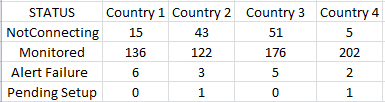
I'd like to add a new row to the results, calculating the %NotConnected for each country.
I have tried using the following to calculate the %NotConnected:
stats count(eval(STATUS="NotConnecting")) AS NotConnected, count(eval(STATUS="Monitored")) AS total | eval %NotConnected=((NotConnecting/Monitored)*100
doesn't seem to work and I am unable to figure out, even if it did work, how to add the calculation for each country to the current results as a new row. Hopefully this makes sense and someone can help me out. I'm fairly new to Splunk and really out of my realm on this one.
Thank you
- Mark as New
- Bookmark Message
- Subscribe to Message
- Mute Message
- Subscribe to RSS Feed
- Permalink
- Report Inappropriate Content

Give this a try
dbx query base search
| chart count over country by status
| eval "%NotConnected"=round('NotConnecting'*100/('NotConnecting' + Monitored + 'Alert Failure' + 'Pending Setup'),2)
| untable country status count
| chart values(count) over status by country
OR
dbx query base search
| chart count over country by status
| addtotal | eval "%NotConnected"=round('NotConnecting'*100/(Total),2)
| untable country status count
| chart values(count) over status by country
- Mark as New
- Bookmark Message
- Subscribe to Message
- Mute Message
- Subscribe to RSS Feed
- Permalink
- Report Inappropriate Content
Give this a try
dbx query base search
| chart count over country by status
| eval "%NotConnected"=round('NotConnecting'*100/('NotConnecting' + Monitored + 'Alert Failure' + 'Pending Setup'),2)
| untable country status count
| chart values(count) over status by country
OR
dbx query base search
| chart count over country by status
| addtotal | eval "%NotConnected"=round('NotConnecting'*100/(Total),2)
| untable country status count
| chart values(count) over status by country
- Mark as New
- Bookmark Message
- Subscribe to Message
- Mute Message
- Subscribe to RSS Feed
- Permalink
- Report Inappropriate Content
Thank you somesoni2,
You pointed me in the right direction. I ended up transposing the original data and used the following to get the totals in a new column rather than in a new row.
dbx query base search
| chart count over CTRY by STATUS limit=20
| eval "%NotConnected"=tostring(round(('Not Connecting'/Monitored)*100,1))+"%"
| table CTRY,Monitored,"NotConnecting","Alert Monitoring Failure","Replacement", %NotConnected
That worked perfectly, Thank you for the help!
- Mark as New
- Bookmark Message
- Subscribe to Message
- Mute Message
- Subscribe to RSS Feed
- Permalink
- Report Inappropriate Content

On a side note, does the eval(STATUS=="NotConnecting") need a double equals sign? I haven't played in a bit so apologies if I'm being too tangential here.



Join the Splunk Community Slack to learn, troubleshoot, and make connections with fellow Splunk practitioners in real time!
Join Splunk User Groups to connect and learn in-person by region or remotely by topic or industry.
Meet Splunk Observability Studio: AI-Assisted OpenTelemetry Instrumentation Without ...
Federated Search for Cisco Security and Analytics Logging (SAL) is now GA on Splunk ...
Your Path to AgenticOps: AI Experiences for Every Splunk Practitioner
