
Join the Conversation
- Find Answers
- :
- Using Splunk
- :
- Splunk Search
- :
- Re: Bar chart with single bar does not display
- Subscribe to RSS Feed
- Mark Topic as New
- Mark Topic as Read
- Float this Topic for Current User
- Bookmark Topic
- Subscribe to Topic
- Mute Topic
- Printer Friendly Page
- Mark as New
- Bookmark Message
- Subscribe to Message
- Mute Message
- Subscribe to RSS Feed
- Permalink
- Report Inappropriate Content
Bar chart with single bar does not display

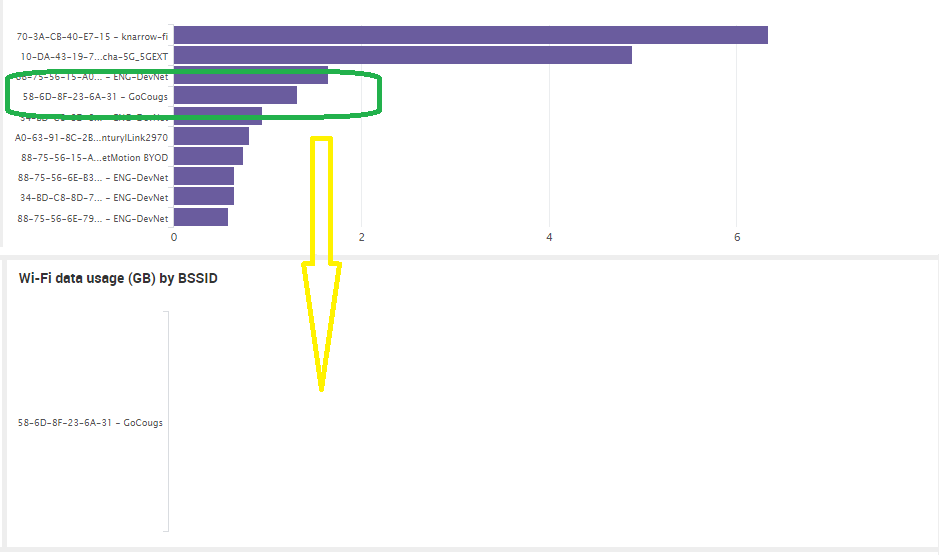
We have horizontal bar charts on our dashboards and when SPL is filtered down to single bar the bar is not displayed.
Is this a know Splunk bug. We are using 7.0

- Mark as New
- Bookmark Message
- Subscribe to Message
- Mute Message
- Subscribe to RSS Feed
- Permalink
- Report Inappropriate Content
If remove:
<option name="charting.axisTitleX.visibility">collapsed</option>
then bar is display otherwise it is not.

- Mark as New
- Bookmark Message
- Subscribe to Message
- Mute Message
- Subscribe to RSS Feed
- Permalink
- Report Inappropriate Content

@simpkins1958, please add your dashboard code.
I think issue could be
1) Either at main bar chart drilldown token (so you should display tokens you set in the Panel <title> OR
2) Second chart should have same by clause as first bar chart.
You can try out the following run anywhere dashboard (base on Splunk's _internal index) to understand
<dashboard>
  <label>Bar chart drilldown.</label>
  <row>
    <panel>
      <title>Bar chart Main Panel</title>
      <chart>
        <search>
          <query>index=_internal sourcetype=splunkd log_level!=INFO
|  stats count by component
|  sort - count
|  head 5</query>
          <earliest>-24h@h</earliest>
          <latest>now</latest>
          <sampleRatio>1</sampleRatio>
        </search>
        <option name="charting.chart">bar</option>
        <option name="charting.drilldown">all</option>
        <drilldown>
          <set token="tokClickedName">$click.name$</set>
          <set token="tokClickedvalue">$click.value$</set>
        </drilldown>
      </chart>
    </panel>
  </row>
  <row>
    <panel>
      <title>Drilldown Bar chart - ( $tokClickedName$=$tokClickedvalue$ )</title>
      <chart>
        <search>
          <query>index=_internal sourcetype=splunkd log_level!=INFO $tokClickedName$=$tokClickedvalue$
  | stats count by $tokClickedName$
          </query>
        </search>
        <option name="charting.chart">bar</option>
        <option name="charting.drilldown">none</option>
      </chart>
    </panel>
  </row>
</dashboard>
| makeresults | eval message= "Happy Splunking!!!"
- Mark as New
- Bookmark Message
- Subscribe to Message
- Mute Message
- Subscribe to RSS Feed
- Permalink
- Report Inappropriate Content
It is a single bar chart having trouble with. Not one bar chart and drilling down to second bar chart.
Your test code works fine.
Here is some of my XML for the chart that is not working. If I remove X visibility the bar is displayed fine.
        <option name="charting.axisTitleX.visibility">collapsed</option>
        <option name="charting.axisTitleY.visibility">collapsed</option>
        <option name="charting.chart">bar</option>
        <option name="charting.drilldown">none</option>
        <option name="charting.legend.placement">none</option>
- Mark as New
- Bookmark Message
- Subscribe to Message
- Mute Message
- Subscribe to RSS Feed
- Permalink
- Report Inappropriate Content
@simpkins1958 , can you give the query for second Bar Chart with single bar? I tried with the properties you have provided and it works fine.
  <row>
    <panel>
      <title>Single Value Bar chart</title>
      <chart>
        <search>
          <query>index=_internal sourcetype=splunkd log_level!=INFO
|  stats count by component
|  sort - count
|  head 1
|  eval component="58-6D-8F-23-6A-31 - Gocougs"</query>
          <earliest>-24h@h</earliest>
          <latest>now</latest>
        </search>
        <option name="charting.chart">bar</option>
        <option name="charting.drilldown">none</option>
         <option name="charting.axisTitleX.visibility">collapsed</option>
         <option name="charting.axisTitleY.visibility">collapsed</option>
         <option name="charting.chart">bar</option>
         <option name="charting.drilldown">none</option>
         <option name="charting.legend.placement">none</option>
      </chart>
    </panel>
  </row>
Just a thought, if your Bar chart is going to be single series, you can also check out Marker or Filler Gauge with rangemap to make more sense out of data.
| makeresults | eval message= "Happy Splunking!!!"
- Mark as New
- Bookmark Message
- Subscribe to Message
- Mute Message
- Subscribe to RSS Feed
- Permalink
- Report Inappropriate Content
@simpkins1958, for me the Chart behavior is as expected. So please provide Second Bar chart search query, if your issue is still not resolved.
| makeresults | eval message= "Happy Splunking!!!"


Join the Splunk Community Slack to learn, troubleshoot, and make connections with fellow Splunk practitioners in real time!
Join Splunk User Groups to connect and learn in-person by region or remotely by topic or industry.
Vibe-coding, AI, and Splunkcraft: Highlights from the .conf26 Builder Bar
Thanks for the Memories: .conf26 Took Learning to New Heights
Best Practices: Splunk auto adjust pipeline queue
