
Join the Conversation
- Find Answers
- :
- Using Splunk
- :
- Splunk Search
- :
- After eval _time, time chart is not considering up...
- Subscribe to RSS Feed
- Mark Topic as New
- Mark Topic as Read
- Float this Topic for Current User
- Bookmark Topic
- Subscribe to Topic
- Mute Topic
- Printer Friendly Page
- Mark as New
- Bookmark Message
- Subscribe to Message
- Mute Message
- Subscribe to RSS Feed
- Permalink
- Report Inappropriate Content
After eval _time, time chart is not considering updated _time

Hi,
I am updating the _time in my search query and passing that to Timechart.
My requirement is that timechart should be created only for specific time. In this example I am removing all data which is older than 4 hrs. So I want timechart only for last 4 hrs. Instead of its creating the timechart based on earliest and latest time
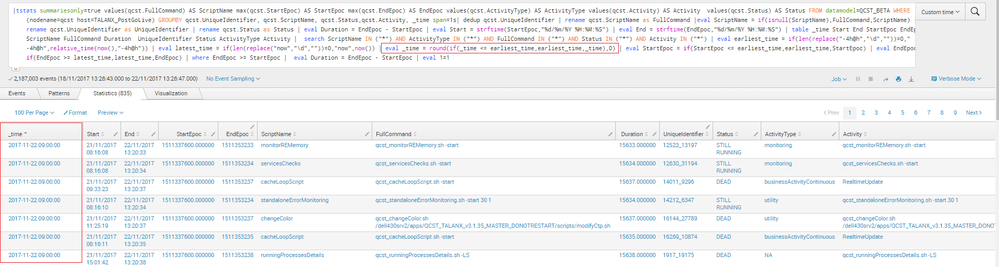
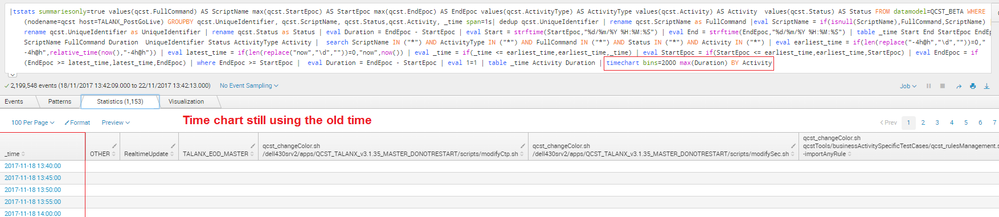
Query:
base search | eval earliest_time = if(len(replace("-4h@h","\d",""))=0,"-4h@h",relative_time(now(),"-4h@h")) | eval latest_time = if(len(replace("now","\d",""))=0,"now",now()) | eval _time = if(_time <= earliest_time,earliest_time,_time) | eval StartEpoc = if(StartEpoc <= earliest_time,earliest_time,StartEpoc) | eval EndEpoc = if(EndEpoc >= latest_time,latest_time,EndEpoc) | where EndEpoc >= StartEpoc | eval Duration = EndEpoc - StartEpoc | eval 1=1 | timechart bins=2000 max(Duration) BY Activity
earlier I had the similar problem but in that _time was not updated in epoch format. but in this case _time is already in epoch format.
related post
I guess, Timechart is created based on earliest and latest time not on _time column. Is there way so timechart is created based on updated _time not by earliest and latest time.
- Mark as New
- Bookmark Message
- Subscribe to Message
- Mute Message
- Subscribe to RSS Feed
- Permalink
- Report Inappropriate Content
@micahkemp : thanks for reply. Now its creating timechart for required time duration but time is unreadable.
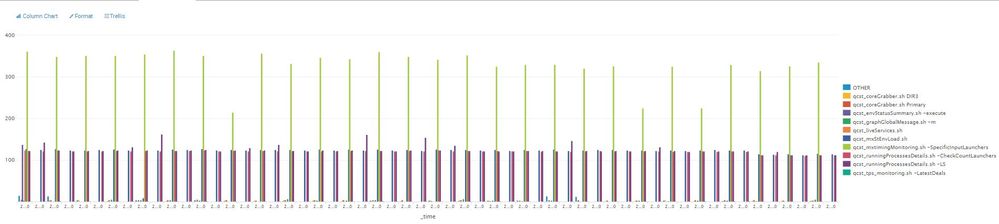


I also tried with fixedrange=false which is slightly better than cont=false but not perfect.
- Mark as New
- Bookmark Message
- Subscribe to Message
- Mute Message
- Subscribe to RSS Feed
- Permalink
- Report Inappropriate Content

Try cont=false in timechart:
base search | eval earliest_time = if(len(replace("-4h@h","\d",""))=0,"-4h@h",relative_time(now(),"-4h@h")) | eval latest_time = if(len(replace("now","\d",""))=0,"now",now()) | eval _time = if(_time <= earliest_time,earliest_time,_time) | eval StartEpoc = if(StartEpoc <= earliest_time,earliest_time,StartEpoc) | eval EndEpoc = if(EndEpoc >= latest_time,latest_time,EndEpoc) | where EndEpoc >= StartEpoc |  eval Duration = EndEpoc - StartEpoc | eval 1=1 | timechart bins=2000 max(Duration) BY Activity

cont
    Syntax: cont=<bool>
    Description: Specifies whether the chart is continuous or not. If set to true, the Search application fills in the time gaps.
    Default: true

Join the Splunk Community Slack to learn, troubleshoot, and make connections with fellow Splunk practitioners in real time!
Join Splunk User Groups to connect and learn in-person by region or remotely by topic or industry.
Meet the .conf26 AI Agent Buildathon Winners
Trusted Autonomy in the SOC: A Maturity Journey
Supercharging Windows Security Detection Performance: Introducing Hybrid Field ...
