
Join the Conversation
- Find Answers
- :
- Splunk Products
- :
- Splunk SOAR
- :
- Wheel installation broken?
- Subscribe to RSS Feed
- Mark Topic as New
- Mark Topic as Read
- Float this Topic for Current User
- Bookmark Topic
- Subscribe to Topic
- Mute Topic
- Printer Friendly Page
- Mark as New
- Bookmark Message
- Subscribe to Message
- Mute Message
- Subscribe to RSS Feed
- Permalink
- Report Inappropriate Content
Wheel installation broken?

I'm currently building an app with Splunk SOAR and somehow the upload functionality for wheel files seems to be broken. I tested with Chrome, Firefox and Internet Explorer all with the same result:
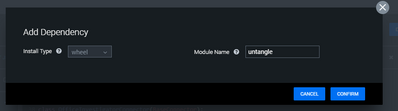
As you can see, there is no "Upload" button or any field to drop the wheel file. My Splunk SOAR version is:
5.2.1.78411
- Mark as New
- Bookmark Message
- Subscribe to Message
- Mute Message
- Subscribe to RSS Feed
- Permalink
- Report Inappropriate Content
I ran in the same issue and i'm writing a reply for others that might need the fix, this is a known bug, the upload button is there but it's hidden by some broken css style. Inspect the html code of the dialogbox(where you don't see the upload button) search for "Upload your wheel file here. Only .whl files allowed." there is an input and a div above this text with "style="display: none;"" remove it in both casses and your upload button will appear. You could also run this bit of js in your console:
document.querySelectorAll("[style*='display: none']").forEach((elem) => {
    elem.style.display = "block"
})

Join the Splunk Community Slack to learn, troubleshoot, and make connections with fellow Splunk practitioners in real time!
Join Splunk User Groups to connect and learn in-person by region or remotely by topic or industry.
Meet the .conf26 AI Agent Buildathon Winners
Trusted Autonomy in the SOC: A Maturity Journey
Supercharging Windows Security Detection Performance: Introducing Hybrid Field ...
