
Join the Conversation
- Find Answers
- :
- Splunk Products
- :
- Splunk SOAR
- :
- Using current container info in a custom function
- Subscribe to RSS Feed
- Mark Topic as New
- Mark Topic as Read
- Float this Topic for Current User
- Bookmark Topic
- Subscribe to Topic
- Mute Topic
- Printer Friendly Page
- Mark as New
- Bookmark Message
- Subscribe to Message
- Mute Message
- Subscribe to RSS Feed
- Permalink
- Report Inappropriate Content
Using current container info in a custom function

Hi,
Within a Custom Function, is it possible to grab information from the current container? For example, I've added this line to a function:
from_address = str(phantom.collect2(container=container, datapath=["artifact:*.cef.fromEmail"], limit=1)[0][0])
Ideally the value of the variable would just be a string of an email address. But I get an error that the variable "container" hasn't been defined.
However, when I test this line in the "custom code" section of a function block within a playbook, it works fine.
Any thoughts on how I can achieve this? Thanks!
- Mark as New
- Bookmark Message
- Subscribe to Message
- Mute Message
- Subscribe to RSS Feed
- Permalink
- Report Inappropriate Content


Howdy!
You'll need to pass in container as a parameter to your function. Here is an example of what I believe you are trying to do:
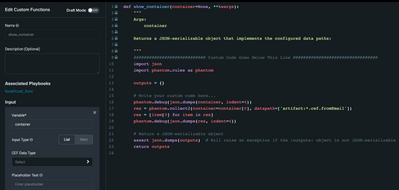
Notice I have a parameter to the custom function called 'container'. I pass that in like this:
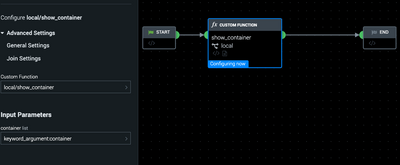
With the container available in the CF, you can use collect2 as expected. Interestingly, notice line 17 on the first screenshot. We have to do "container=container[0]" because the Container parameter of collect2 expects a dict but the data comes in as a list, so we have to extract the dict from the list's first element.

Join the Splunk Community Slack to learn, troubleshoot, and make connections with fellow Splunk practitioners in real time!
Join Splunk User Groups to connect and learn in-person by region or remotely by topic or industry.
Meet the .conf26 AI Agent Buildathon Winners
Trusted Autonomy in the SOC: A Maturity Journey
Supercharging Windows Security Detection Performance: Introducing Hybrid Field ...
