
Join the Conversation
- Find Answers
- :
- Splunk Products
- :
- Splunk SOAR
- :
- Re: Is there a way to try 'except' functionality w...
- Subscribe to RSS Feed
- Mark Topic as New
- Mark Topic as Read
- Float this Topic for Current User
- Bookmark Topic
- Subscribe to Topic
- Mute Topic
- Printer Friendly Page
- Mark as New
- Bookmark Message
- Subscribe to Message
- Mute Message
- Subscribe to RSS Feed
- Permalink
- Report Inappropriate Content

Fairly new to writing playbooks within Phantom and so far havent found documentation for this yet:
I'm trying to create an email notification (or something along those lines) whenever a playbook fails to complete for whatever reason (main fail case is if a splunk search fails/job dies). Basically almost like a try/except block but in Phantom. Has anyone found a way to incorporate this in phantom?
- Mark as New
- Bookmark Message
- Subscribe to Message
- Mute Message
- Subscribe to RSS Feed
- Permalink
- Report Inappropriate Content


@nongingerale this is something you need to build into your playbook(s).
All actions have a 'status' output which can be used in a decision block which then checks for the success/failed output and if not success then route down a path to a 'send_email' action or input playbook. I would recommend input playbook so you can re-use for all failures in your automation.
For checking playbook failures, rather than action failures, you would probably need to use REST to check `/rest/playbook_run` for any that have a status of failed on a schedule (use timer app) and then sends an email if more than 1 failure found.
Hope this helps!
Happy SOARing!
- Mark as New
- Bookmark Message
- Subscribe to Message
- Mute Message
- Subscribe to RSS Feed
- Permalink
- Report Inappropriate Content
Yep - just like @phanTom says - you can check the "status" output for an app action. I would do something like this:
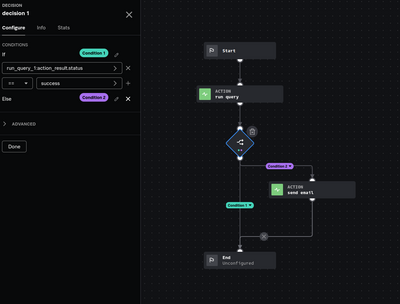
The decision checks the status of the Splunk "Run Query" app action, if successful; end, Else; send an email.
You can do stiff with "try/except" in regular codeblocks but to be honest they become a pain to manage in larger playbooks. I know when i started with playbooks, i had to try and unlearn how I'd do it in python, and think about it in terms of SOAR's playbook capabilities, but I am better off for it 😄
- Mark as New
- Bookmark Message
- Subscribe to Message
- Mute Message
- Subscribe to RSS Feed
- Permalink
- Report Inappropriate Content
that makes sense, thanks for the help!
- Mark as New
- Bookmark Message
- Subscribe to Message
- Mute Message
- Subscribe to RSS Feed
- Permalink
- Report Inappropriate Content
@nongingerale this is something you need to build into your playbook(s).
All actions have a 'status' output which can be used in a decision block which then checks for the success/failed output and if not success then route down a path to a 'send_email' action or input playbook. I would recommend input playbook so you can re-use for all failures in your automation.
For checking playbook failures, rather than action failures, you would probably need to use REST to check `/rest/playbook_run` for any that have a status of failed on a schedule (use timer app) and then sends an email if more than 1 failure found.
Hope this helps!
Happy SOARing!
- Mark as New
- Bookmark Message
- Subscribe to Message
- Mute Message
- Subscribe to RSS Feed
- Permalink
- Report Inappropriate Content
thanks! appreciate the help

Join the Splunk Community Slack to learn, troubleshoot, and make connections with fellow Splunk practitioners in real time!
Join Splunk User Groups to connect and learn in-person by region or remotely by topic or industry.
Persistent Queue at TcpOut — One of Splunk's Most Practical Features
Catalog Is Now Generally Available on Splunk Cloud Platform
Your Path to AgenticOps: AI Experiences for Every Splunk Practitioner
