
Join the Conversation
- Find Answers
- :
- Premium Solutions
- :
- Splunk ITSI
- :
- Re: Unsupported debian version while installing co...
- Subscribe to RSS Feed
- Mark Topic as New
- Mark Topic as Read
- Float this Topic for Current User
- Bookmark Topic
- Subscribe to Topic
- Mute Topic
- Printer Friendly Page
- Mark as New
- Bookmark Message
- Subscribe to Message
- Mute Message
- Subscribe to RSS Feed
- Permalink
- Report Inappropriate Content
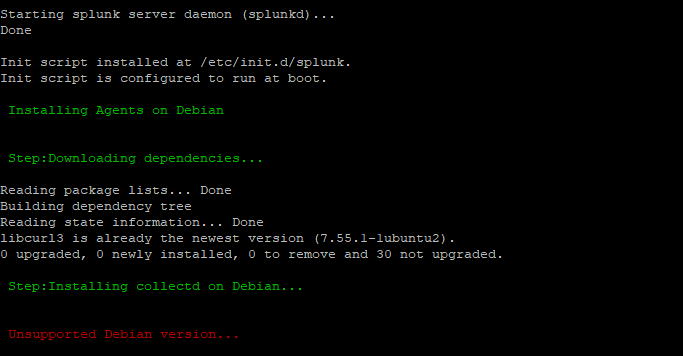
Unsupported debian version while installing collector(metrics collector)

We are facing problem while installing a collector(metrics collector) from the script on the Ubuntu 18.04 LTS machine.
As we have run the same script on the same version of Ubuntu and its working perfectly fine.
Please refer to the images attached with this question.
- Mark as New
- Bookmark Message
- Subscribe to Message
- Mute Message
- Subscribe to RSS Feed
- Permalink
- Report Inappropriate Content

Can you please try this command manually: apt-get install collectd . OR apt-cache policy collectd
- Mark as New
- Bookmark Message
- Subscribe to Message
- Mute Message
- Subscribe to RSS Feed
- Permalink
- Report Inappropriate Content
I have tried both the command still getting below errors:-
# apt-get install collectd
Reading package lists... Done
Building dependency tree
Reading state information... Done
E: Unable to locate package collectd
# apt-cache policy collectd
N: Unable to locate package collectd
- Mark as New
- Bookmark Message
- Subscribe to Message
- Mute Message
- Subscribe to RSS Feed
- Permalink
- Report Inappropriate Content
Ubuntu bionic has collectd package. For some reason yours don't have that:
https://packages.ubuntu.com/bionic/collectd
Do apt-get update and retry?
- Mark as New
- Bookmark Message
- Subscribe to Message
- Mute Message
- Subscribe to RSS Feed
- Permalink
- Report Inappropriate Content
I have already done apt-get update



Join the Splunk Community Slack to learn, troubleshoot, and make connections with fellow Splunk practitioners in real time!
Join Splunk User Groups to connect and learn in-person by region or remotely by topic or industry.
Data Management Digest – September 2026
Federated Search for CloudWatch Unified Data Store Is Generally Available
Announcing Modern Navigation: A New Era of Splunk User Experience
