
Turn on suggestions
Auto-suggest helps you quickly narrow down your search results by suggesting possible matches as you type.
Splunk ITSI
×
Join the Conversation
Without signing in, you're just watching from the sidelines. Sign in or Register to connect, share, and be part of the Splunk Community.
Turn on suggestions
Auto-suggest helps you quickly narrow down your search results by suggesting possible matches as you type.
- Find Answers
- :
- Premium Solutions
- :
- Splunk ITSI
- :
- How to manage _time field with schedule change in ...
Options
- Subscribe to RSS Feed
- Mark Topic as New
- Mark Topic as Read
- Float this Topic for Current User
- Bookmark Topic
- Subscribe to Topic
- Mute Topic
- Printer Friendly Page
- Mark as New
- Bookmark Message
- Subscribe to Message
- Mute Message
- Subscribe to RSS Feed
- Permalink
- Report Inappropriate Content
How to manage _time field with schedule change in Europe zone ?

mah
Builder
10-27-2020
02:52 AM
Hi,
With the time change, my logs are shifted by one hour (logs from an HEC input) :
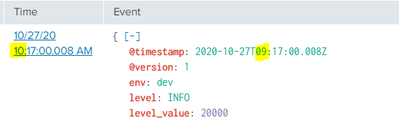
It is the same case on many logs from several sources.
Like logs from Azure add-on (the props is correctly set with a TIME_PREFIX on the field Horodate) :
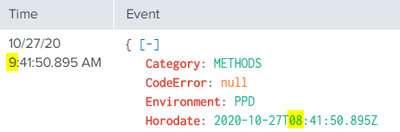
And same case from other add-on...
How can I fix this ?
Thank you!
- Mark as New
- Bookmark Message
- Subscribe to Message
- Mute Message
- Subscribe to RSS Feed
- Permalink
- Report Inappropriate Content

richgalloway

SplunkTrust
10-27-2020
06:42 AM
What is the TIME_FORMAT setting in props.conf?
Is the system clock correct? What time zone does the system use?
---
If this reply helps you, Karma would be appreciated.
If this reply helps you, Karma would be appreciated.
- Mark as New
- Bookmark Message
- Subscribe to Message
- Mute Message
- Subscribe to RSS Feed
- Permalink
- Report Inappropriate Content
mah
Builder
10-27-2020
07:26 AM
Actually, I have this issue on many logs.
What is the TIME_FORMAT setting in props.conf?
Example of props.conf for the two pictures below :
[sourcetype_picture1]
SHOULD_LINEMERGE = false
LINE_BREAKER = ([\r\n]+)
TRUNCATE = 999999
TIME_PREFIX = \"\@timestamp\"\:
[sourcetype_picture2]
SHOULD_LINEMERGE = 0
category = Splunk App Add-on Builder
pulldown_type = 1
INDEXED_EXTRACTIONS = json
TIME_PREFIX = Horodate
SHOULD_LINEMERGE = 0
category = Splunk App Add-on Builder
pulldown_type = 1
INDEXED_EXTRACTIONS = json
TIME_PREFIX = Horodate
This both example worked good until the schedule change on Sunday.
Is the system clock correct?
Actually I did not find a TZ by default for the system.
This TZ parameter is set on some apps like add-on splunk but sometime it is UTC and sometime it is GMT .
What time zone does the system use?
I did not find a TZ by default for the system.

Get Updates on the Splunk Community!
Accelerating Observability as Code with the Splunk AI Assistant
We’ve seen in previous posts what Observability as Code (OaC) is and how it’s now essential for managing ...
Integrating Splunk Search API and Quarto to Create Reproducible Investigation ...
Splunk is More Than Just the Web Console
For Digital Forensics and Incident Response (DFIR) practitioners, ...
Congratulations to the 2025-2026 SplunkTrust!
Hello, Splunk Community! We are beyond thrilled to announce our newest group of SplunkTrust members!
The ...
