
Join the Conversation
- Find Answers
- :
- Splunk Products
- :
- Splunk Enterprise
- :
- duplicate events, multiple indexed times
- Subscribe to RSS Feed
- Mark Topic as New
- Mark Topic as Read
- Float this Topic for Current User
- Bookmark Topic
- Subscribe to Topic
- Mute Topic
- Printer Friendly Page
- Mark as New
- Bookmark Message
- Subscribe to Message
- Mute Message
- Subscribe to RSS Feed
- Permalink
- Report Inappropriate Content
duplicate events, multiple indexed times

hello,
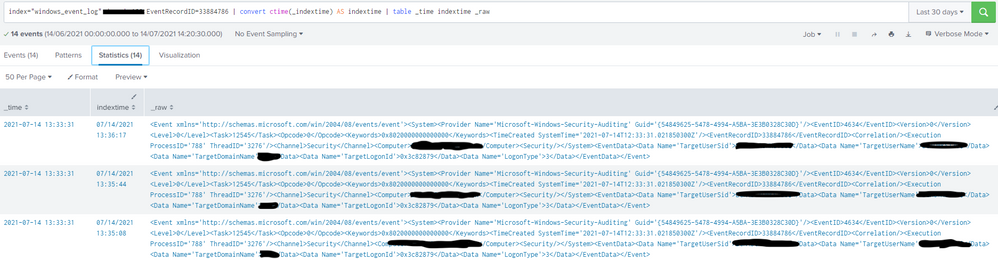
i am monitoring windows event logs and ingesting them to my indexers, the issue is that even with a unique EventRecordID i am seeing multiple events in Splunk, sometimes up to 28.
second to that, when i complete the two searches in the picture i can see that the same event is being indexed multiple times (14) between 13:33:31 and 13:36:00
any help on how to rectify this issue is greatly appreciated.
please see attached the two searches showing multiple indexed results and also multiple indexed times.

- Mark as New
- Bookmark Message
- Subscribe to Message
- Mute Message
- Subscribe to RSS Feed
- Permalink
- Report Inappropriate Content

Are your log files being rotated, such as to zip files? Duplicate events such as this can happen if log files are rotated, renamed, or compressed. Splunk will see those as new files and ingest them, unless you explicitly blacklist them.
Try adding source to your search to see what files the events are coming from.
An upvote would be appreciated and Accept Solution if it helps!
- Mark as New
- Bookmark Message
- Subscribe to Message
- Mute Message
- Subscribe to RSS Feed
- Permalink
- Report Inappropriate Content
How to resolve the issue if logs are rotated or compressed. How to blacklist them?
Splunk is ingesting duplicate events in my org.
Help me how to fix issue if logs are rotated or compressed.
Highly appreciate your help.
- Mark as New
- Bookmark Message
- Subscribe to Message
- Mute Message
- Subscribe to RSS Feed
- Permalink
- Report Inappropriate Content
Hey codebuilder,
the source is in the second pic, it shows all source and sourcetypes are the same for all dupicates.
i am using the standard windows app, there is no log rotating or zip as it is purely the windows events being monitored.
- Mark as New
- Bookmark Message
- Subscribe to Message
- Mute Message
- Subscribe to RSS Feed
- Permalink
- Report Inappropriate Content
That pic doesn't include the actual source file.
Try running the following:
|tstats count where index=windows_event_log by source
An upvote would be appreciated and Accept Solution if it helps!
- Mark as New
- Bookmark Message
- Subscribe to Message
- Mute Message
- Subscribe to RSS Feed
- Permalink
- Report Inappropriate Content
Good morning,
So if i did your search without specifically asking for that EventRecordID i have the three sources
XmlWinEventLog:Application
XmlWinEvenLog:Security
XmlWinEventLog:System
If however i do the same with that specific EventRecordID it is only aligned to source;
XmlWinEventLog:Security
Which means that it is coming from only one source.

Join the Splunk Community Slack to learn, troubleshoot, and make connections with fellow Splunk practitioners in real time!
Join Splunk User Groups to connect and learn in-person by region or remotely by topic or industry.
Index This | What travels the world but is also stuck in place?
Discover New Use Cases: Unlock Greater Value from Your Existing Splunk Data
Continue Your Journey: Join Session 2 of the Data Management and Federation Bootcamp ...
