
Join the Conversation
- Find Answers
- :
- Splunk Platform
- :
- Splunk Enterprise
- :
- could not use strptime to parse timestamp from "" ...
- Subscribe to RSS Feed
- Mark Topic as New
- Mark Topic as Read
- Float this Topic for Current User
- Bookmark Topic
- Subscribe to Topic
- Mute Topic
- Printer Friendly Page
- Mark as New
- Bookmark Message
- Subscribe to Message
- Mute Message
- Subscribe to RSS Feed
- Permalink
- Report Inappropriate Content

Hi,
I have a problem with the timestamp of my logs which is the same for all event whereas it must be one event each minute.
I can also see a "none" in timestamp field :

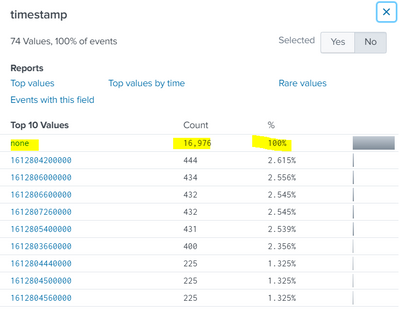
here some events raw :
{"dimensions": ["CLOUD_APPLICATION_NAMESPACE", "CLOUD_APPLICATION_INSTANCE_DEPLOYMENT_TYPE_KUBERNETES_STATEFUL_SET"], "metricId": "builtin:cloud.kubernetes.namespace.memoryRequests", "timestamp": 1612807800000, "value": 6144000000.0}
{"dimensions": ["CLOUD_APPLICATION_NAMESPACE", "CLOUD_APPLICATION_INSTANCE_DEPLOYMENT_TYPE_KUBERNETES_STATEFUL_SET"], "metricId": "builtin:cloud.kubernetes.namespace.memoryRequests", "timestamp": 1612807740000, "value": 6144000000.0}
{"dimensions": ["CLOUD_APPLICATION_NAMESPACE", "CLOUD_APPLICATION_INSTANCE_DEPLOYMENT_TYPE_KUBERNETES_STATEFUL_SET"], "metricId": "builtin:cloud.kubernetes.namespace.memoryRequests", "timestamp": 1612807680000, "value": 6144000000.0}
{"dimensions": ["CLOUD_APPLICATION_NAMESPACE", "CLOUD_APPLICATION_INSTANCE_DEPLOYMENT_TYPE_KUBERNETES_STATEFUL_SET"], "metricId": "builtin:cloud.kubernetes.namespace.memoryRequests", "timestamp": 1612807620000, "value": 6144000000.0}
{"dimensions": ["CLOUD_APPLICATION_NAMESPACE", "CLOUD_APPLICATION_INSTANCE_DEPLOYMENT_TYPE_KUBERNETES_STATEFUL_SET"], "metricId": "builtin:cloud.kubernetes.namespace.memoryRequests", "timestamp": 1612807560000, "value": 6144000000.0}
{"dimensions": ["CLOUD_APPLICATION_NAMESPACE", "CLOUD_APPLICATION_INSTANCE_DEPLOYMENT_TYPE_KUBERNETES_STATEFUL_SET"], "metricId": "builtin:cloud.kubernetes.namespace.memoryRequests", "timestamp": 1612807500000, "value": 6144000000.0}
here is my props.conf (apply on the Heavy forwarder and not the search head) :
[my_sourcetype]
SHOULD_LINEMERGE = false
TIME_PREFIX = timestamp
TIME_FORMAT = %s%3Q
TRUNCATE = 999999
MAX_EVENTS = 10000
Can you tell me what is wrong ?
- Mark as New
- Bookmark Message
- Subscribe to Message
- Mute Message
- Subscribe to RSS Feed
- Permalink
- Report Inappropriate Content
Hi @richgalloway ,
I get the answer and it is completely my fault !
There were a mistake in the name of the sourcetype in my inputs.conf ....
Now there is no more "none" value and the TIME_PREFIX is well applied.
Thanks for your help anyway !
- Mark as New
- Bookmark Message
- Subscribe to Message
- Mute Message
- Subscribe to RSS Feed
- Permalink
- Report Inappropriate Content


They may not help, but try these settings.
[my_sourcetype]
SHOULD_LINEMERGE = false
TIME_PREFIX = timestamp":
TIME_FORMAT = %s%3N
TRUNCATE = 999999
MAX_EVENTS = 10000
MAX_TIMESTAMP_LOOKAHEAD = 15If this reply helps you, Karma would be appreciated.
- Mark as New
- Bookmark Message
- Subscribe to Message
- Mute Message
- Subscribe to RSS Feed
- Permalink
- Report Inappropriate Content
hi @richgalloway ,
Thanks to your reply but it does not work at all ... the value none is still in addition in the timestamp field and the parsing is not applied :
new props. conf with your modification :
SHOULD_LINEMERGE = false
TIME_PREFIX = timestamp":
TIME_FORMAT = %s%3Q
MAX_TIMESTAMP_LOOKAHEAD = 30
TRUNCATE = 999999
MAX_EVENTS = 10000
the result :
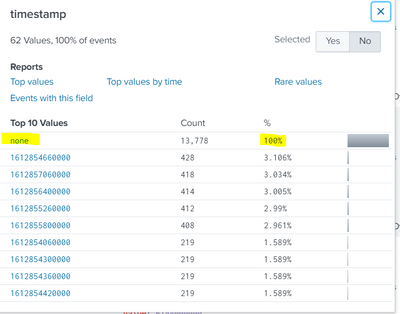
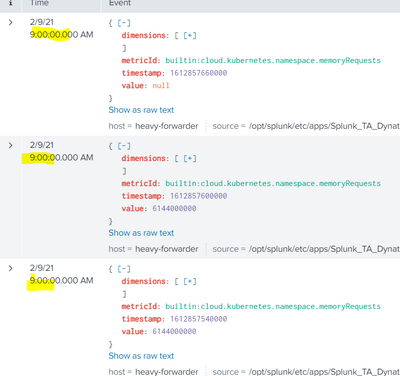
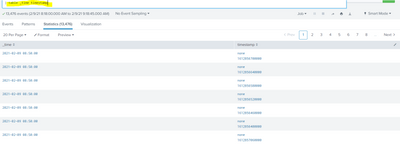
the _time is still the indexing time...
Can you see another solution please ?
Perhaps the format of my logs ? the values of the timestamp is not in quotation marks, is this cause this problem ?
- Mark as New
- Bookmark Message
- Subscribe to Message
- Mute Message
- Subscribe to RSS Feed
- Permalink
- Report Inappropriate Content
Hi @richgalloway ,
I get the answer and it is completely my fault !
There were a mistake in the name of the sourcetype in my inputs.conf ....
Now there is no more "none" value and the TIME_PREFIX is well applied.
Thanks for your help anyway !

A Season of Skills: New Splunk Courses to Light Up Your Learning Journey
Announcing the Migration of the Splunk Add-on for Microsoft Azure Inputs to ...
Splunk Observability for AI
