
Join the Conversation
- Find Answers
- :
- Splunk Products
- :
- Splunk Enterprise
- :
- Why is SmartStore Download Upload Failing?
- Subscribe to RSS Feed
- Mark Topic as New
- Mark Topic as Read
- Float this Topic for Current User
- Bookmark Topic
- Subscribe to Topic
- Mute Topic
- Printer Friendly Page
- Mark as New
- Bookmark Message
- Subscribe to Message
- Mute Message
- Subscribe to RSS Feed
- Permalink
- Report Inappropriate Content
Why is SmartStore Download Upload Failing?

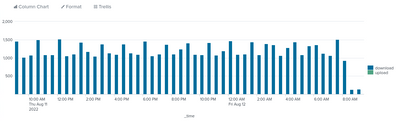
Hello everyone. We are experiencing download and a few upload failures from our Indexers to SmartStore in AWS S3.
Graph for the last 24 hours.
I previously increased the Cache Manager limits from the default of 8 to 128 with a custom server.conf:
[cachemanager]
max_concurrent_downloads = 128
max_concurrent_uploads = 128
An example of an upload faliure from the splunkd.log file (sourcetype=splunkd source="/opt/splunk/var/log/splunk/splunkd.log" component=CacheManager log_level=ERROR):
08-12-2022 03:37:28.565 +0000 ERROR CacheManager [950069 cachemanagerUploadExecutorWorker-0] - action=upload, cache_id="dma|<INDEX>~925~054DE1B7-4619-4FBC-B159-D4013D4C30AE|C1AB9688-CBC2-428C-99F5-027FA469269D_DM_Splunk_SA_CIM_Network_Sessions", status=failed, reason="Unknown", elapsed_ms=12050
08-12-2022 03:37:28.484 +0000 ERROR CacheManager [950069 cachemanagerUploadExecutorWorker-0] - action=upload, cache_id="dma|<INDEX>~925~054DE1B7-4619-4FBC-B159-D4013D4C30AE|C1AB9688-CBC2-428C-99F5-027FA469269D_DM_Splunk_SA_CIM_Network_Sessions", status=failed, unable to check if receipt exists at path=<INDEX>/dma/de/07/925~054DE1B7-4619-4FBC-B159-D4013D4C30AE/C1AB9688-CBC2-428C-99F5-027FA469269D_DM_Splunk_SA_CIM_Network_Sessions/receipt.json(0,-1,), error="network error"
An example of a download failure:
08-12-2022 09:06:44.488 +0000 ERROR CacheManager [1951184 cachemanagerDownloadExecutorWorker-113] - action=download, cache_id="dma|<INDEX>~204~431C8F6B-2313-4365-942D-09051BE286B8|C1AB9688-CBC2-428C-99F5-027FA469269D_DM_Splunk_SA_CIM_Performance", status=failed, reason="Unknown", elapsed_ms=483
We previously had an issue with NACLs in AWS where the S3 IP ranges had been updated but the NACLs were out of date. We have allowed access to all S3 IP ranges in our region.
Does anyone have an idea of how I can troubleshoot this so we can reduce, or eliminate the failures?
Anyone else had any experience with this?

Join the Splunk Community Slack to learn, troubleshoot, and make connections with fellow Splunk practitioners in real time!
Join Splunk User Groups to connect and learn in-person by region or remotely by topic or industry.
Persistent Queue at TcpOut — One of Splunk's Most Practical Features
Catalog Is Now Generally Available on Splunk Cloud Platform
Your Path to AgenticOps: AI Experiences for Every Splunk Practitioner
