
Join the Conversation
- Find Answers
- :
- Splunk Platform
- :
- Splunk Enterprise
- :
- Where could I edit the apps bar on splunk?
- Subscribe to RSS Feed
- Mark Topic as New
- Mark Topic as Read
- Float this Topic for Current User
- Bookmark Topic
- Subscribe to Topic
- Mute Topic
- Printer Friendly Page
- Mark as New
- Bookmark Message
- Subscribe to Message
- Mute Message
- Subscribe to RSS Feed
- Permalink
- Report Inappropriate Content

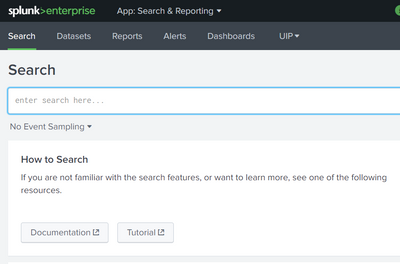
I want to add another title next to "UIP" on the apps bar!
Settings-->User Interface-->Navigation Menus-->
<nav search_view="search">
<view name="search" default='true' />
<view name="datasets" />
<view name="reports" />
<view name="alerts" />
<view name="dashboards" />
<collection label="UIP">
<view name="login_name"/>
<view name="agent"/>
<view name="hase_dashboard"/>
<view name="hase_uip_data_search"/>
</collection>
<collection label="CIVR">
<view name="IVR-CC"/>
<view name="IVR-CC3"/>
</collection>
</nav>
- Mark as New
- Bookmark Message
- Subscribe to Message
- Mute Message
- Subscribe to RSS Feed
- Permalink
- Report Inappropriate Content


Hi @Jennifer
id of dashboard is same is view name IVR_CC3
updated view name in naviagnation menu <view name="IVR_CC3"/>
- Mark as New
- Bookmark Message
- Subscribe to Message
- Mute Message
- Subscribe to RSS Feed
- Permalink
- Report Inappropriate Content


Additionally, if you have access to the shell, you can find the viewname in below path:
- For views/dashboards that ships directly with the app: $SPLUNK_HOME/etc/apps/<app_name>/default/data/ui/views/<viewname>.xml
- For views/dashboards that were created from an app:
$SPLUNK_HOME/etc/apps/<app_name>/local/data/ui/views/<viewname>.xml
If you find the answer helpful, an upvote/karma is appreciated
- Mark as New
- Bookmark Message
- Subscribe to Message
- Mute Message
- Subscribe to RSS Feed
- Permalink
- Report Inappropriate Content

Hello Jenifer,
This is exactly how you are supposed to do it.
But be aware that if there is no dashboard called "IVR-CC" or "IVR-CC3", "CIVR" will not appear.
And "IVR-CC" should not be the title but the id of the dashboard.
Hope it helps 🙂
- Mark as New
- Bookmark Message
- Subscribe to Message
- Mute Message
- Subscribe to RSS Feed
- Permalink
- Report Inappropriate Content
Where could I check the id of my dashboards? I can't open this link http://yoursplunk:8000/en-US/manager/search/data/ui/views
- Mark as New
- Bookmark Message
- Subscribe to Message
- Mute Message
- Subscribe to RSS Feed
- Permalink
- Report Inappropriate Content

Not sure why you can't open that link - did you approach it through Settings -> User Interface -> Views?
Aside from that, if you look at the address bar from one of the opened dashboards, you may find the view name
http://yoursplunk:8000/en-US/app/<appname>/<viewname>- Mark as New
- Bookmark Message
- Subscribe to Message
- Mute Message
- Subscribe to RSS Feed
- Permalink
- Report Inappropriate Content
So I could see this page but still where I could check the id of the dashboard of IVR_CC3
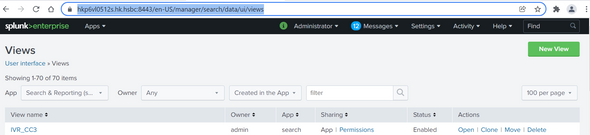
https://hkp6vl0512s.hk.hsbc:8443/en-US/manager/search/data/ui/views
- Mark as New
- Bookmark Message
- Subscribe to Message
- Mute Message
- Subscribe to RSS Feed
- Permalink
- Report Inappropriate Content
Hi @Jennifer
id of dashboard is same is view name IVR_CC3
updated view name in naviagnation menu <view name="IVR_CC3"/>
- Mark as New
- Bookmark Message
- Subscribe to Message
- Mute Message
- Subscribe to RSS Feed
- Permalink
- Report Inappropriate Content


[Puzzles] Solve, Learn, Repeat: Nested loops in Event Conversion
Your Guide to Splunk Digital Experience Monitoring
Data Management Digest – November 2025
