
Join the Conversation
- Find Answers
- :
- Splunk Platform
- :
- Splunk Enterprise
- :
- Though I have my script in place in the directory,...
- Subscribe to RSS Feed
- Mark Topic as New
- Mark Topic as Read
- Float this Topic for Current User
- Bookmark Topic
- Subscribe to Topic
- Mute Topic
- Printer Friendly Page
- Mark as New
- Bookmark Message
- Subscribe to Message
- Mute Message
- Subscribe to RSS Feed
- Permalink
- Report Inappropriate Content
Though I have my script in place in the directory, why is the data input wizard stating: "No Scripts found under the selected path"

Hello,
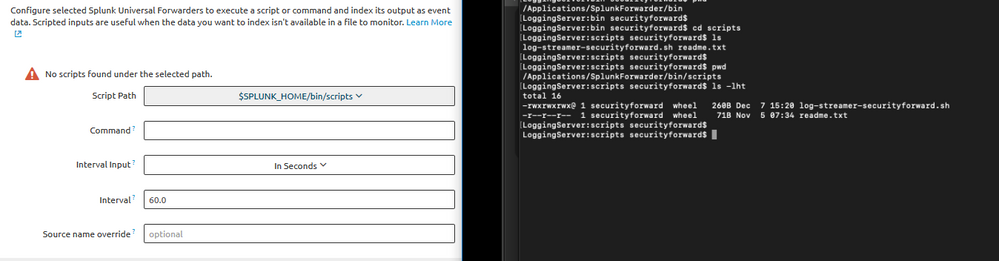
I have a universal forwarder installed on Mac OS X and am unable to configure data input to use a script. The script is in place in the directory with the proper permissions, but the data input wizard states that "No Scripts found under the selected path.".
Any ideas?

- Mark as New
- Bookmark Message
- Subscribe to Message
- Mute Message
- Subscribe to RSS Feed
- Permalink
- Report Inappropriate Content

Hi! There are basically two ways to configure a Universal Forwarder: Either 1) by using the CLI or configuration files directly on the Universal Forwarder or by 2) using a deployment server.
I suppose you want to use a deployment server. In this case, the deployment server will distribute the configuration (including scripts) to the Universal Forwarder. When creating a new Forwarded Script Input via the deployment server's web GUI then you need to place the script on your deployment server (not on your Universal Forwarder as seen in your screenshot) in $SPLUNK_HOME/bin/scripts. The script will then get transferred to the Universal Forwarder as part of the Server Class.
- Mark as New
- Bookmark Message
- Subscribe to Message
- Mute Message
- Subscribe to RSS Feed
- Permalink
- Report Inappropriate Content
Hello! Thanks for the reply. This really clears some things up. What if you are running Splunk Light in the cloud. If the instance is in the cloud how does one access it to create/modify/upload different deployment items?
Thanks!
- Mark as New
- Bookmark Message
- Subscribe to Message
- Mute Message
- Subscribe to RSS Feed
- Permalink
- Report Inappropriate Content

@securityforward, try adding it to the "splunk installation directory"/bin/scripts
What goes around comes around. If it helps, hit it with Karma 🙂
- Mark as New
- Bookmark Message
- Subscribe to Message
- Mute Message
- Subscribe to RSS Feed
- Permalink
- Report Inappropriate Content
Thanks for the response! In the CLI screenshot on the right, it shows the path as "/Applications/SplunkForwarder/bin/scripts" which should be the splunk installation directory.
- Mark as New
- Bookmark Message
- Subscribe to Message
- Mute Message
- Subscribe to RSS Feed
- Permalink
- Report Inappropriate Content
Ok, check if the SPLUNK_HOME is set properly to the installation directory and also the SPLUNK user has permission to the folder structure not only the file
What goes around comes around. If it helps, hit it with Karma 🙂

A Season of Skills: New Splunk Courses to Light Up Your Learning Journey
Announcing the Migration of the Splunk Add-on for Microsoft Azure Inputs to ...
Splunk Observability for AI
