
Join the Conversation
- Find Answers
- :
- Splunk Products
- :
- Splunk Enterprise
- :
- Re: Splunk KV store Issue
- Subscribe to RSS Feed
- Mark Topic as New
- Mark Topic as Read
- Float this Topic for Current User
- Bookmark Topic
- Subscribe to Topic
- Mute Topic
- Printer Friendly Page
- Mark as New
- Bookmark Message
- Subscribe to Message
- Mute Message
- Subscribe to RSS Feed
- Permalink
- Report Inappropriate Content
Splunk KV store Issue

Hi Team,
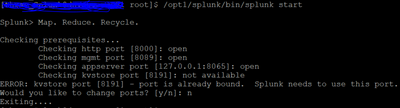
We have 4 Search heads are in cluster in that one Search head is getting the KV store PORT issue asking that change the port remaining 3 SHs working fine. We are unable to restart the Splunk on that particular SH. If i check the SH cluster status only 3 servers are showing now.
Splunk installed version: 9.0.4.1
for error visibility Please find the attached.
Regards,
Siva.
- Mark as New
- Bookmark Message
- Subscribe to Message
- Mute Message
- Subscribe to RSS Feed
- Permalink
- Report Inappropriate Content


Hi @sivakrishna
it seems KVstrore port 8191 is used by other application.
can you check which process using 8191 port ,
ps -ef | grep -i 8191
if is used by other application check with os team to check and ask them use other port,
then you can start splunk and kvstore will start on port 8191
- Mark as New
- Bookmark Message
- Subscribe to Message
- Mute Message
- Subscribe to RSS Feed
- Permalink
- Report Inappropriate Content
Thanks for the reply!!
can we change the port for this server??
What will happen if i change the PORT for this single server when it's in the cluster?
Remaining 3 servers are running on the 8191 PORT.
- Mark as New
- Bookmark Message
- Subscribe to Message
- Mute Message
- Subscribe to RSS Feed
- Permalink
- Report Inappropriate Content
Hi @sivakrishna
instaed of changing rhe port, if 8191 is already used by splunk then please kill and start the splunk
have you checked which process using 8191 ,
if you wan the change the port , you need to change port on rest search heads, which is not recomended
- Mark as New
- Bookmark Message
- Subscribe to Message
- Mute Message
- Subscribe to RSS Feed
- Permalink
- Report Inappropriate Content
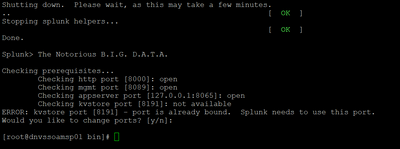
Still getting the same PORT issue @SanjayReddy
- Mark as New
- Bookmark Message
- Subscribe to Message
- Mute Message
- Subscribe to RSS Feed
- Permalink
- Report Inappropriate Content



Join the Splunk Community Slack to learn, troubleshoot, and make connections with fellow Splunk practitioners in real time!
Join Splunk User Groups to connect and learn in-person by region or remotely by topic or industry.
SOC4Kafka - New Kafka Connector Powered by OpenTelemetry
Rounding off the Splunk Dashboard Contest
A Four Part Event Series: AI + Observability: AI Agents, LLMs, Apps, & Infrastructure
