
Join the Conversation
- Find Answers
- :
- Splunk Products
- :
- Splunk Enterprise
- :
- Re: Log level extraction
- Subscribe to RSS Feed
- Mark Topic as New
- Mark Topic as Read
- Float this Topic for Current User
- Bookmark Topic
- Subscribe to Topic
- Mute Topic
- Printer Friendly Page
- Mark as New
- Bookmark Message
- Subscribe to Message
- Mute Message
- Subscribe to RSS Feed
- Permalink
- Report Inappropriate Content

here is some sample data, can someone help me with a regular expression to extract the highlighted part "status:READY_TO_PROCESS" as process status
2020-10-18 14:06:18 [bp-[507bbd99]-completeMachineRun-233466] HitService [INFO] Created typed run Run: id=233467, uuid=7653767a-5e85-409d-aa3e-69bbeac40ad0 name=Final Results {size:0, status:READY_TO_PROCESS, rootRun:7653767a-5e85-409d-aa3e-69bbeac40ad0, data:}
- Mark as New
- Bookmark Message
- Subscribe to Message
- Mute Message
- Subscribe to RSS Feed
- Permalink
- Report Inappropriate Content


Hi
I expecting that there is always word status and then it’s value ending to ,. If this is not a valid expectation then this rex needs to updated.
...
| rex "(?<status>status:[^,]+)"
r. Ismo
- Mark as New
- Bookmark Message
- Subscribe to Message
- Mute Message
- Subscribe to RSS Feed
- Permalink
- Report Inappropriate Content
Sorry but it's pulling something totally different
- Mark as New
- Bookmark Message
- Subscribe to Message
- Mute Message
- Subscribe to RSS Feed
- Permalink
- Report Inappropriate Content
- Mark as New
- Bookmark Message
- Subscribe to Message
- Mute Message
- Subscribe to RSS Feed
- Permalink
- Report Inappropriate Content
Hi
I expecting that there is always word status and then it’s value ending to ,. If this is not a valid expectation then this rex needs to updated.
...
| rex "(?<status>status:[^,]+)"
r. Ismo
- Mark as New
- Bookmark Message
- Subscribe to Message
- Mute Message
- Subscribe to RSS Feed
- Permalink
- Report Inappropriate Content
- Mark as New
- Bookmark Message
- Subscribe to Message
- Mute Message
- Subscribe to RSS Feed
- Permalink
- Report Inappropriate Content

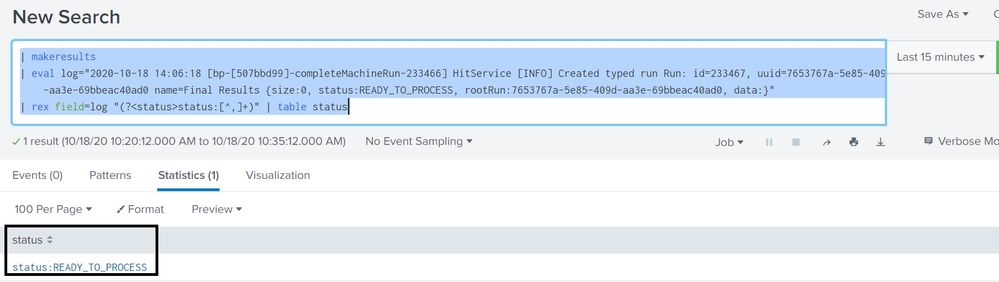
Hi @sphiwee ... @isoutamo 's rex query is working fine and extracting the status msg(did you add the plus sign and the field=_raw or ur fieldname?). Please check the screenshot:
| makeresults
| eval log="2020-10-18 14:06:18 [bp-[507bbd99]-completeMachineRun-233466] HitService [INFO] Created typed run Run: id=233467, uuid=7653767a-5e85-409d-aa3e-69bbeac40ad0 name=Final Results {size:0, status:READY_TO_PROCESS, rootRun:7653767a-5e85-409d-aa3e-69bbeac40ad0, data:}"
| rex field=log "(?<status>status:[^,]+)" | table status


Join the Splunk Community Slack to learn, troubleshoot, and make connections with fellow Splunk practitioners in real time!
Join Splunk User Groups to connect and learn in-person by region or remotely by topic or industry.
Vibe-coding, AI, and Splunkcraft: Highlights from the .conf26 Builder Bar
Thanks for the Memories: .conf26 Took Learning to New Heights
Best Practices: Splunk auto adjust pipeline queue
