
Join the Conversation
- Find Answers
- :
- Splunk Products
- :
- Splunk Enterprise
- :
- Re: Send Email error - SMTP server
- Subscribe to RSS Feed
- Mark Topic as New
- Mark Topic as Read
- Float this Topic for Current User
- Bookmark Topic
- Subscribe to Topic
- Mute Topic
- Printer Friendly Page
- Mark as New
- Bookmark Message
- Subscribe to Message
- Mute Message
- Subscribe to RSS Feed
- Permalink
- Report Inappropriate Content

Hi all, I'm to trying to set an email alert notification using Splunk enterprise 9.0 but I am getting the following error:

I checked the error logs and details are below:

Could anyone help me to understand this and guide me in right direction to resolve this error? Thanks.
Regards,
Aish
- Mark as New
- Bookmark Message
- Subscribe to Message
- Mute Message
- Subscribe to RSS Feed
- Permalink
- Report Inappropriate Content


Hi
this error message means that your splunk instance has configured to use user which haven't right to send email to your configured smtp-server.
Here is instructions how to configure your splunk to send emails. https://docs.splunk.com/Documentation/Splunk/latest/Alert/Emailnotification
Be sure that your are using smtp-server which allow sending emails from your server. Usually there are some requirements which your client must fulfil before it can send email. You can get those from your SMTP server admin.
r. Ismo
- Mark as New
- Bookmark Message
- Subscribe to Message
- Mute Message
- Subscribe to RSS Feed
- Permalink
- Report Inappropriate Content
Hi
this error message means that your splunk instance has configured to use user which haven't right to send email to your configured smtp-server.
Here is instructions how to configure your splunk to send emails. https://docs.splunk.com/Documentation/Splunk/latest/Alert/Emailnotification
Be sure that your are using smtp-server which allow sending emails from your server. Usually there are some requirements which your client must fulfil before it can send email. You can get those from your SMTP server admin.
r. Ismo
- Mark as New
- Bookmark Message
- Subscribe to Message
- Mute Message
- Subscribe to RSS Feed
- Permalink
- Report Inappropriate Content
Hi,
I have configured the instance to SMTP server. Here are the details:
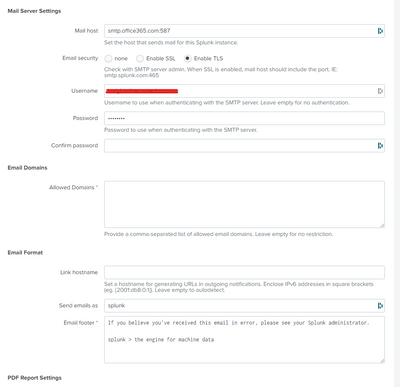
Also, could you please explain in more detail (example) about: "Usually there are some requirements which your client must fulfil before it can send email."
Thank you.
Regards,
Aish
- Mark as New
- Bookmark Message
- Subscribe to Message
- Mute Message
- Subscribe to RSS Feed
- Permalink
- Report Inappropriate Content
Hello all,
I have a problem with my configuration smtp.
When I send e-mail I get this error :
2024-02-14 16:44:15,213 +0100 ERROR cli_common:482 - Failed to decrypt value: ***************************=, error: Read custom key data size=30
Someone has an idea?
- Mark as New
- Bookmark Message
- Subscribe to Message
- Mute Message
- Subscribe to RSS Feed
- Permalink
- Report Inappropriate Content
This line in $SPLUNK_HOME/lib/python3.7/site-packages/splunk/clilib/cli_common.py was the source of an error when configuration initialization is slow...
 if err:
    logger.error(
        'Failed to decrypt value: {}, error: {}'.format(value, err))
    return None
  return out.strip()
There is a wallclock message that gets in the middle of the decrypt operation causing it to fail.
Changed code to this, and problem went away.
if 'took wallclock_ms' no in err:
    logger.error(
        'Failed to decrypt value: {}, error: {}'.format(value, err))
    return None
  return out.strip()
- Mark as New
- Bookmark Message
- Subscribe to Message
- Mute Message
- Subscribe to RSS Feed
- Permalink
- Report Inappropriate Content

Hello,
We are facing the same issue.
How did you identify the wallclock message ? is it possible that for us is a different one?
I tried your solution after correcting the python
if 'took wallclock_ms' not in err:
but hasn't worked for us.
Thanks,
José


Join the Splunk Community Slack to learn, troubleshoot, and make connections with fellow Splunk practitioners in real time!
Join Splunk User Groups to connect and learn in-person by region or remotely by topic or industry.
Announcing Modern Navigation: A New Era of Splunk User Experience
Preparing your Splunk Environment for OpenSSL3
Self-Healing Pipeline Is Now Generally Available: AI-Powered CIM Compliance
