
Join the Conversation
- Find Answers
- :
- Splunk Products
- :
- Splunk Enterprise Security
- :
- Re: Why aren't Risk Score, Risk Event and Risk Obj...
- Subscribe to RSS Feed
- Mark Topic as New
- Mark Topic as Read
- Float this Topic for Current User
- Bookmark Topic
- Subscribe to Topic
- Mute Topic
- Printer Friendly Page
- Mark as New
- Bookmark Message
- Subscribe to Message
- Mute Message
- Subscribe to RSS Feed
- Permalink
- Report Inappropriate Content
Why aren't Risk Score, Risk Event and Risk Object showing in the notable event?

Hi peeps,
We were fine tuning the Notable Event, and there were fields that were not showing any values. Those fields are the Risk Score, Risk Event and Risk Object. We have configure the value under the Risk Analysis Tab.
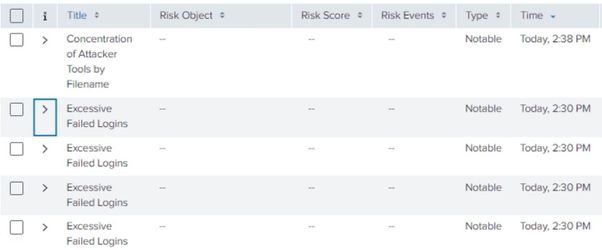
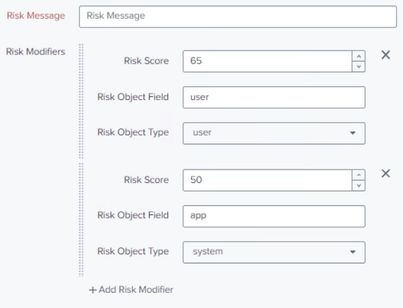
Please assist us on this. Thank you.
- Mark as New
- Bookmark Message
- Subscribe to Message
- Mute Message
- Subscribe to RSS Feed
- Permalink
- Report Inappropriate Content
Hey so did you find the solution? We stacked with the same issue and seams no one knows how to fix it.
- Mark as New
- Bookmark Message
- Subscribe to Message
- Mute Message
- Subscribe to RSS Feed
- Permalink
- Report Inappropriate Content

Have you found a solution for this? I'm experiencing the same thing, and I made sure that the fields we provided in the Risk Analysis Adaptive response Action is a valid field that is being presented in the correlation search results. In fact, I'm using the same fields as variables in the title of the notable event. But nothing is populating in Incident review for Risk Score, Risk Event, and Risk Object.
- Mark as New
- Bookmark Message
- Subscribe to Message
- Mute Message
- Subscribe to RSS Feed
- Permalink
- Report Inappropriate Content


Hi. Yes, I see the confusion. The fields you add under the response action "Risk Analysis" are not added the the notable event itself (index=notable), they are added to the risk event (index=risk). These risk events are used for Risk-Based Alerting, among other things.
If you want the "user" and "app" fields to be added to the notable event, just make sure these fields are present in the final output of your correlation search, and you shoud see them in the incident.


Join the Splunk Community Slack to learn, troubleshoot, and make connections with fellow Splunk practitioners in real time!
Join Splunk User Groups to connect and learn in-person by region or remotely by topic or industry.
Meet Splunk Observability Studio: AI-Assisted OpenTelemetry Instrumentation Without ...
Federated Search for Cisco Security and Analytics Logging (SAL) is now GA on Splunk ...
Your Path to AgenticOps: AI Experiences for Every Splunk Practitioner
