
Join the Conversation
- Find Answers
- :
- Premium Solutions
- :
- Splunk Enterprise Security
- :
- Re: Splunk Enterprise Security: How can I edit a n...
- Subscribe to RSS Feed
- Mark Topic as New
- Mark Topic as Read
- Float this Topic for Current User
- Bookmark Topic
- Subscribe to Topic
- Mute Topic
- Printer Friendly Page
- Mark as New
- Bookmark Message
- Subscribe to Message
- Mute Message
- Subscribe to RSS Feed
- Permalink
- Report Inappropriate Content

I want to zebra strip (gray, white, gray, white)/alternate the row colors in the triggered notable table in the Incident Review dashboard. I need help either editing or converting it to HTML so i can edit the raw code. I know the CSS to add, just need to know how or if i can edit?
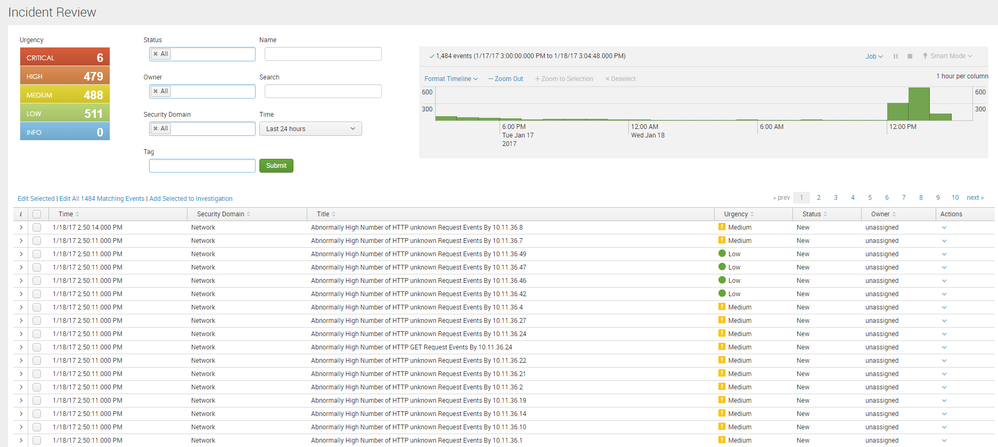
Thanks in advance

- Mark as New
- Bookmark Message
- Subscribe to Message
- Mute Message
- Subscribe to RSS Feed
- Permalink
- Report Inappropriate Content


I have not played around with it in depth but the place you will want to look is in $SPLUNK_HOME/etc/apps/SA-ThreatIntelligence/appserver/static/js/components/incident_review.
There are css and js files that can be manipulated.
- Mark as New
- Bookmark Message
- Subscribe to Message
- Mute Message
- Subscribe to RSS Feed
- Permalink
- Report Inappropriate Content
I have not played around with it in depth but the place you will want to look is in $SPLUNK_HOME/etc/apps/SA-ThreatIntelligence/appserver/static/js/components/incident_review.
There are css and js files that can be manipulated.
- Mark as New
- Bookmark Message
- Subscribe to Message
- Mute Message
- Subscribe to RSS Feed
- Permalink
- Report Inappropriate Content

I think that was possible at 2017 😊
Now there is an automatically generated js file here ./apps/SA-ThreatIntelligence/appserver/static/build/pages/incident_review.js
- Mark as New
- Bookmark Message
- Subscribe to Message
- Mute Message
- Subscribe to RSS Feed
- Permalink
- Report Inappropriate Content
cool thanks I will check it out on my test server. and get back you to if i can get it to work.

Upcoming Webinar: Unmasking Insider Threats with Slunk Enterprise Security’s UEBA
.conf25 technical session recap of Observability for Gen AI: Monitoring LLM ...
A Season of Skills: New Splunk Courses to Light Up Your Learning Journey
