
Turn on suggestions
Auto-suggest helps you quickly narrow down your search results by suggesting possible matches as you type.
Splunk Enterprise Security
×
Join the Conversation
Without signing in, you're just watching from the sidelines. Sign in or Register to connect, share, and be part of the Splunk Community.
Turn on suggestions
Auto-suggest helps you quickly narrow down your search results by suggesting possible matches as you type.
- Find Answers
- :
- Premium Solutions
- :
- Splunk Enterprise Security
- :
- Notable Events in Incident Management Review not p...
Options
- Subscribe to RSS Feed
- Mark Topic as New
- Mark Topic as Read
- Float this Topic for Current User
- Bookmark Topic
- Subscribe to Topic
- Mute Topic
- Printer Friendly Page
- Mark as New
- Bookmark Message
- Subscribe to Message
- Mute Message
- Subscribe to RSS Feed
- Permalink
- Report Inappropriate Content
Notable Events in Incident Management Review not properly generated

xnx_1012
Explorer
09-15-2021
08:49 PM
Hi to whomever find this
The incident management review settings has repeated events
What I did?
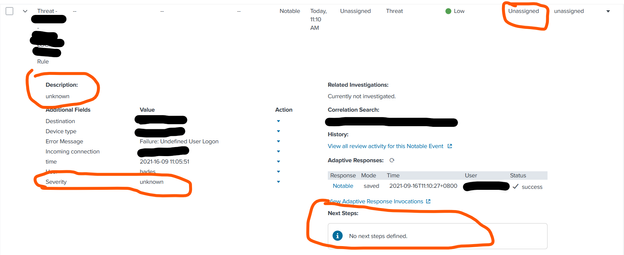
I purpose logged in with the wrong information to some device, but I only did it once. Howver, the result shown below is generated twice in the Incident Management Review

My settings for this correlation search
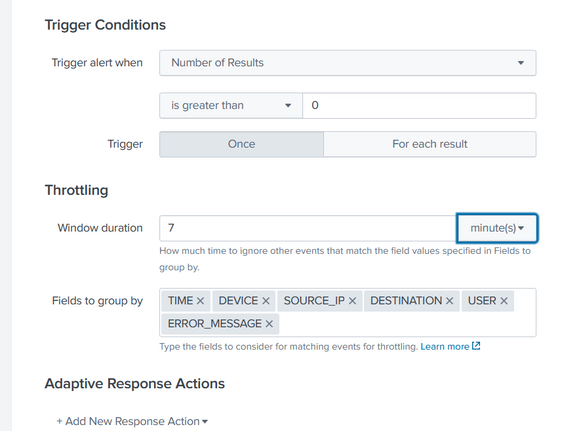
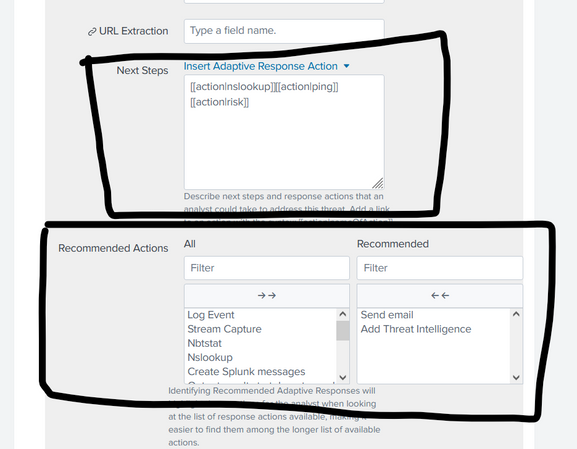
Also, the things I have specified, such as:
- Severity
- Default Status
- Recommended Actions
were not shown whenever the event is generated
Result
Settings


Get Updates on the Splunk Community!
Splunk Observability for AI
Don’t miss out on an exciting Tech Talk on Splunk Observability for AI!
Discover how Splunk’s agentic AI ...
[Puzzles] Solve, Learn, Repeat: Dereferencing XML to Fixed-length events
This challenge was first posted on Slack #puzzles channelFor a previous puzzle, I needed a set of fixed-length ...
Stay Connected: Your Guide to December Tech Talks, Office Hours, and Webinars!
What are Community Office Hours?
Community Office Hours is an interactive 60-minute Zoom series where ...
