
Join the Conversation
- Find Answers
- :
- Splunk Products
- :
- Splunk Enterprise Security
- :
- Re: How to customize Threat Activity dashboard by ...
- Subscribe to RSS Feed
- Mark Topic as New
- Mark Topic as Read
- Float this Topic for Current User
- Bookmark Topic
- Subscribe to Topic
- Mute Topic
- Printer Friendly Page
- Mark as New
- Bookmark Message
- Subscribe to Message
- Mute Message
- Subscribe to RSS Feed
- Permalink
- Report Inappropriate Content
How to customize Threat Activity dashboard by adding new fields?

Hello!
I am experiencing troubles with analyzing Threat Intelligence data in Enterprise Security. When I go to Security Intelligence -> Threat Intelligence -> Threat Activity, here is Threat Activity Details panel.
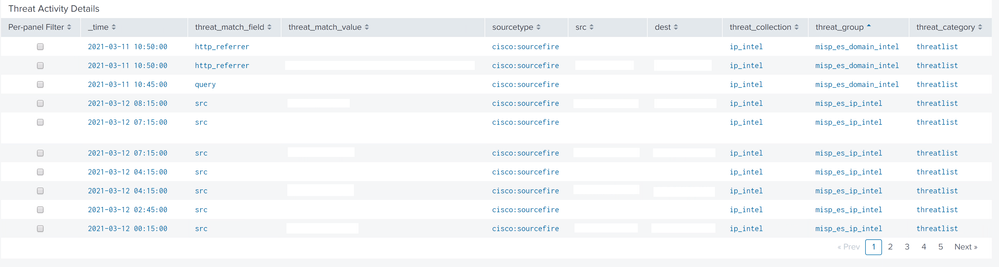
It would be great if you can help me with the following questions:
1) The data for this panel it taken from Threat Intelligence datamodel (threat_activity index). As I undersand correctly, threat_activity index is filled with the help of all these searches (Certificates Intelligence, Email Intelligence, etc.)
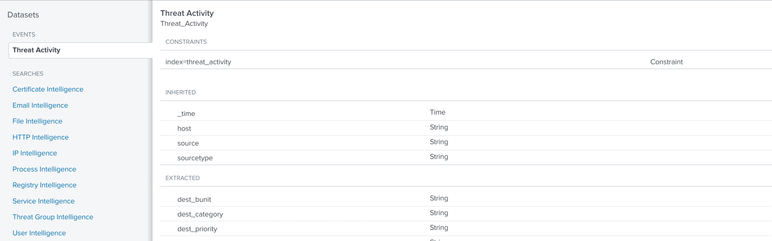
Can you please show me the example how to add some more data to this index, because I would like to receive the information not only about the threat match field, but also about the Data Model (from where the threat match field came from), about the type of data (rec_type_simple), src and dest ports, etc.
2) Here in Threat Activity Details panel we have a field threat_group (misp_es_domain_intel, misp_es_ip_intel). If you are aware please tell me where I can change this field (I would like to add a pipe delimited field from lookup, so that it looks like misp_es_domain_intel | CERT). I have reviewed the full search already, which forms Threat Activity Details panel, but
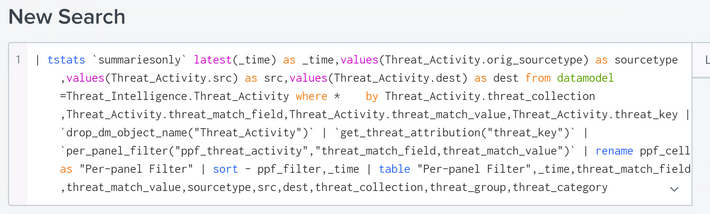
but here are a lot of macros and I get lost where exactly I should change the threat_group field.
- Mark as New
- Bookmark Message
- Subscribe to Message
- Mute Message
- Subscribe to RSS Feed
- Permalink
- Report Inappropriate Content
Hi, have you found solution for this? Im currently facing the same issue. Need to add more information.

Join the Splunk Community Slack to learn, troubleshoot, and make connections with fellow Splunk practitioners in real time!
Join Splunk User Groups to connect and learn in-person by region or remotely by topic or industry.
Design, Compete, Win: Submit Your Best Splunk Dashboards for a .conf26 Pass
May 2026 Splunk Expert Sessions: Security & Observability
Network to App: Observability Unlocked [May & June Series]
