
Join the Conversation
- Find Answers
- :
- Splunk Products
- :
- Splunk Enterprise Security
- :
- How to Add Workflow Search Action under notable ev...
- Subscribe to RSS Feed
- Mark Topic as New
- Mark Topic as Read
- Float this Topic for Current User
- Bookmark Topic
- Subscribe to Topic
- Mute Topic
- Printer Friendly Page
- Mark as New
- Bookmark Message
- Subscribe to Message
- Mute Message
- Subscribe to RSS Feed
- Permalink
- Report Inappropriate Content
How to Add Workflow Search Action under notable event

From a Splunk custom App, I need to add the workflow action which should be displayed under the Actions menu for the notable event in the Incident Review view in the Splunk Enterprise Security. I have created a workflow action with 'Show Action in' attribute set to 'Event menu' and this workflow action is not visible in the notable event Actions ( in both the search and Incident Review view in the Enterprise Security ) but visible in the search view of the Splunk Enterprise.
- Mark as New
- Bookmark Message
- Subscribe to Message
- Mute Message
- Subscribe to RSS Feed
- Permalink
- Report Inappropriate Content


In ES you can setup Adaptive Response Actions that you can either make a correlation search run automatically when its triggered or ru n it your self you want.
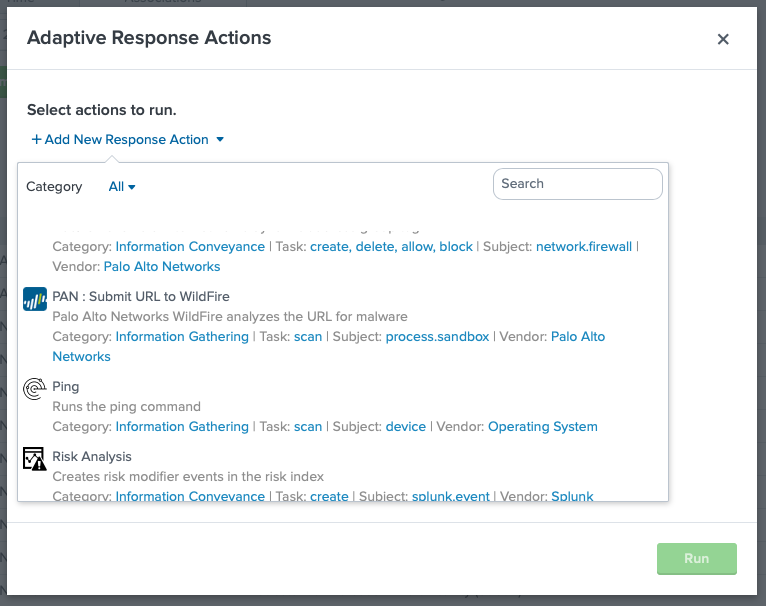
In the Incident review dashboard got the the actions column and select "Run Adaptive Response Action"

And then select whatever action you want use. Some TAs already bring some of these actions and you can make your own.

NOTE: your workflow actions will still work on a field basis in the incident review dashboard.
More info on Adaptive Response Actions from docs:
https://docs.splunk.com/Documentation/ES/5.3.1/Admin/Setupadaptiveresponse
More info on how to create your own Adaptive Response Action
http://dev.splunk.com/view/enterprise-security/SP-CAAAFBF
Hope I was able to help you. If so, some karma would be appreciated.
- Mark as New
- Bookmark Message
- Subscribe to Message
- Mute Message
- Subscribe to RSS Feed
- Permalink
- Report Inappropriate Content
Thanks for the info.. Can this be achieved using workflow actions instead of adaptive response actions as I have already have workflow action created for it. If I can only use the adaptive responsive action, can responsive action be created in the Splunk ES from a different Splunk app?



Join the Splunk Community Slack to learn, troubleshoot, and make connections with fellow Splunk practitioners in real time!
Join Splunk User Groups to connect and learn in-person by region or remotely by topic or industry.
Vibe-coding, AI, and Splunkcraft: Highlights from the .conf26 Builder Bar
Thanks for the Memories: .conf26 Took Learning to New Heights
Best Practices: Splunk auto adjust pipeline queue
