
Join the Conversation
- Find Answers
- :
- Splunk Products
- :
- Splunk Enterprise Security
- :
- Re: How do I make the correlation search generate ...
- Subscribe to RSS Feed
- Mark Topic as New
- Mark Topic as Read
- Float this Topic for Current User
- Bookmark Topic
- Subscribe to Topic
- Mute Topic
- Printer Friendly Page
- Mark as New
- Bookmark Message
- Subscribe to Message
- Mute Message
- Subscribe to RSS Feed
- Permalink
- Report Inappropriate Content
How do I make the correlation search generate notable event

Hi,
Based on my understanding, from the Splunk Guide, https://docs.splunk.com/Documentation/ES/6.6.0/Admin/Configurecorrelationsearches, I just need to add the notable under adaptive response. I did
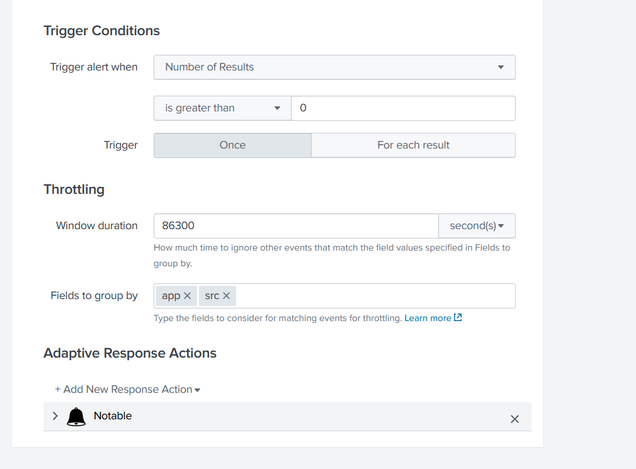
However, I try to fail log in, the notable events shown in the Incident Review dashboard, is 0.
But when I run the spl, I embedded in my correlation search, the SPL can fetch all the fail logged ins that I tried
- Mark as New
- Bookmark Message
- Subscribe to Message
- Mute Message
- Subscribe to RSS Feed
- Permalink
- Report Inappropriate Content
Just want to understand how you are setting your throttling?
- Mark as New
- Bookmark Message
- Subscribe to Message
- Mute Message
- Subscribe to RSS Feed
- Permalink
- Report Inappropriate Content
Hello,
I did something like this
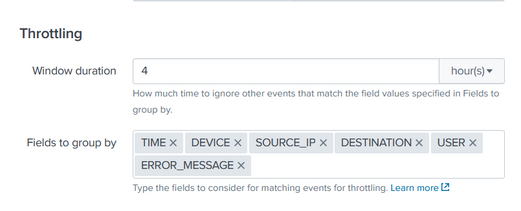
and can I ask if I have an event that has
Time: 3pm
Device: Firewall
Source_IP : 8.8.8.8
Destination: 1.1.1.1
User: user1
Error_message: Error
and this keep happening over and over again in 1 hour time range with the same value. The throttle would help to prevent it right? But if it is different value then it would be a notable, am I right
- Mark as New
- Bookmark Message
- Subscribe to Message
- Mute Message
- Subscribe to RSS Feed
- Permalink
- Report Inappropriate Content
Hi
In this case all events would be throttled for 4 hours based on the fields you choose. After changing the Throttling did you see any Notable event generate? if not Other thing you can review what time range you are selecting for your search to run. Hope this help
- Mark as New
- Bookmark Message
- Subscribe to Message
- Mute Message
- Subscribe to RSS Feed
- Permalink
- Report Inappropriate Content
Hello, yes, when I made it 7 minutes, the event is there however, I see it like generating the same event again.
- Mark as New
- Bookmark Message
- Subscribe to Message
- Mute Message
- Subscribe to RSS Feed
- Permalink
- Report Inappropriate Content
So if you make windows duration 7 min then it only throttle for 7 min and then generate event after that. you have to adjust your time range and throttling windows according to your events frequency.
- Mark as New
- Bookmark Message
- Subscribe to Message
- Mute Message
- Subscribe to RSS Feed
- Permalink
- Report Inappropriate Content
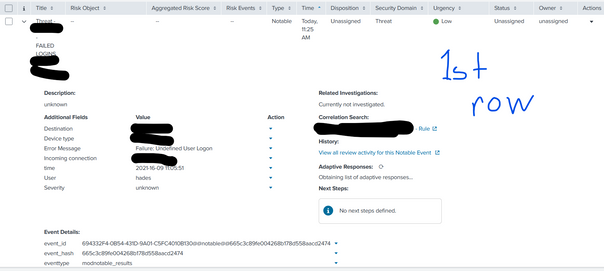
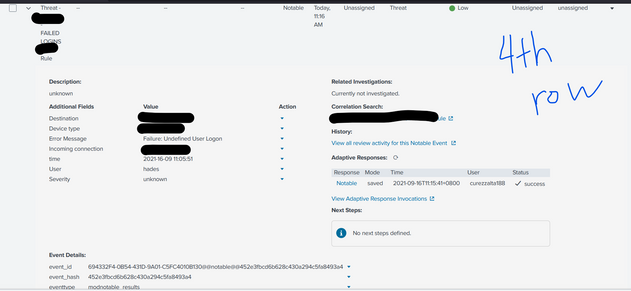
Hello so I can generate the event, however it is the same event that has been generated previously
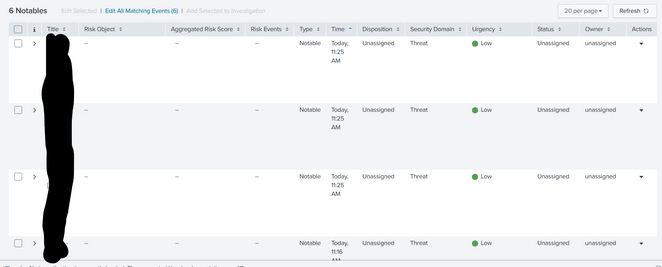
SAME EVENTS

Join the Splunk Community Slack to learn, troubleshoot, and make connections with fellow Splunk practitioners in real time!
Join Splunk User Groups to connect and learn in-person by region or remotely by topic or industry.
Announcing Modern Navigation: A New Era of Splunk User Experience
Modernize your Splunk Apps – Introducing Python 3.13 in Splunk
Step into “Hunt the Insider: An Splunk ES Premier Mystery” to catch a cybercriminal ...
