
Join the Conversation
- Find Answers
- :
- Premium Solutions
- :
- Splunk Enterprise Security
- :
- How do I display 2 lines on a line graph? The fiel...
- Subscribe to RSS Feed
- Mark Topic as New
- Mark Topic as Read
- Float this Topic for Current User
- Bookmark Topic
- Subscribe to Topic
- Mute Topic
- Printer Friendly Page
- Mark as New
- Bookmark Message
- Subscribe to Message
- Mute Message
- Subscribe to RSS Feed
- Permalink
- Report Inappropriate Content
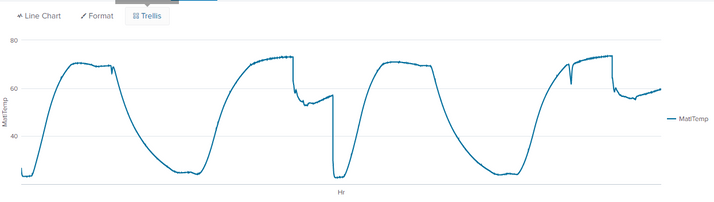
How do I display 2 lines on a line graph? The fields used are "MatlTemp" and "Hour" and it is sorted by "Batch"

I am using 2 csv files and the "inputlookup" method. Right now I am appending one of the csv to another csv, but the line chart that is displayed out only have one line. Both of the csv files has the same fields but i want the the graph to have 2 lines, one line for the first "batch" and the second line for the second "Batch" . How do I write the codes to let the graph get sorted by the "Batch" number so there will be 2 lines?
Current codes :
| from inputlookup:"5019609_V-094_9007270566.csv"| append [| from inputlookup "5019609_V-094_9007280926.csv"] | fields Hr MatlTemp
Current Picture of line graph :
- Mark as New
- Bookmark Message
- Subscribe to Message
- Mute Message
- Subscribe to RSS Feed
- Permalink
- Report Inappropriate Content


- Mark as New
- Bookmark Message
- Subscribe to Message
- Mute Message
- Subscribe to RSS Feed
- Permalink
- Report Inappropriate Content
Okay a second line appeared but is it there a solution to sort the line chart by fields instead? I have a big data so its not efficient to rename the fields every time I want to compare a new set of data. If there is a sorting solution then the data would automatically be sorted by the "Batch" number. Thank You!

[Puzzles] Solve, Learn, Repeat: Dynamic formatting from XML events
Enter the Agentic Era with Splunk AI Assistant for SPL 1.4
Stronger Security with Federated Search for S3, GCP SQL & Australian Threat ...
