
Join the Conversation
- Find Answers
- :
- Splunk Products
- :
- Splunk Enterprise Security
- :
- Re: Error after update - Threat Intel
- Subscribe to RSS Feed
- Mark Topic as New
- Mark Topic as Read
- Float this Topic for Current User
- Bookmark Topic
- Subscribe to Topic
- Mute Topic
- Printer Friendly Page
- Mark as New
- Bookmark Message
- Subscribe to Message
- Mute Message
- Subscribe to RSS Feed
- Permalink
- Report Inappropriate Content

Hello,
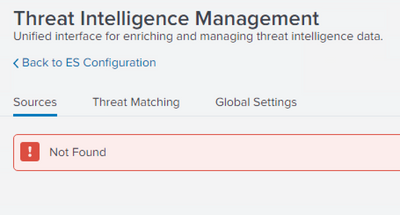
After updating SES to version 6.4.0, the menu Configure > Data Enrichment > Threat intelligence Management shows an empty content page with an error "Not found"
/app/SplunkEnterpriseSecuritySuite/ess_threat_intelligence_management
I have also checked this article, without success.
Have you encountered this, any ideas ?
Thanks,
- Mark as New
- Bookmark Message
- Subscribe to Message
- Mute Message
- Subscribe to RSS Feed
- Permalink
- Report Inappropriate Content

@acadea - We upgraded to 6.4.1 and I noticed the change in the 'release notes' - threat performance improvements - https://docs.splunk.com/Documentation/ES/6.4.0/RN/Enhancements . The ES Configuration health check will also complain about this. So, if you can remove the deprecated links/navigations, or restore the default navigation with 6.4.0 and add your custom changes to the ES navigation. This should fix your navigation errors.
Hope this helps.
- Mark as New
- Bookmark Message
- Subscribe to Message
- Mute Message
- Subscribe to RSS Feed
- Permalink
- Report Inappropriate Content
hello,
indeed, the old stanzas were not compatible anymore. after upgrading from 6.4.0 to 6.4.1 the issue has been fixed.
thanks
- Mark as New
- Bookmark Message
- Subscribe to Message
- Mute Message
- Subscribe to RSS Feed
- Permalink
- Report Inappropriate Content
@acadea - We upgraded to 6.4.1 and I noticed the change in the 'release notes' - threat performance improvements - https://docs.splunk.com/Documentation/ES/6.4.0/RN/Enhancements . The ES Configuration health check will also complain about this. So, if you can remove the deprecated links/navigations, or restore the default navigation with 6.4.0 and add your custom changes to the ES navigation. This should fix your navigation errors.
Hope this helps.

Join the Splunk Community Slack to learn, troubleshoot, and make connections with fellow Splunk practitioners in real time!
Join Splunk User Groups to connect and learn in-person by region or remotely by topic or industry.
Agent Mode Engaged! Enchaining Agentic Operations with Splunk AI Assistant 2.0
Announcing Modern Navigation: A New Era of Splunk User Experience
Modernize your Splunk Apps – Introducing Python 3.13 in Splunk
