
Join the Conversation
- Find Answers
- :
- Splunk Products
- :
- Splunk Enterprise Security
- :
- Enterprise Security Correlation Rules
- Subscribe to RSS Feed
- Mark Topic as New
- Mark Topic as Read
- Float this Topic for Current User
- Bookmark Topic
- Subscribe to Topic
- Mute Topic
- Printer Friendly Page
- Mark as New
- Bookmark Message
- Subscribe to Message
- Mute Message
- Subscribe to RSS Feed
- Permalink
- Report Inappropriate Content
Enterprise Security Correlation Rules

Hi,
How is it possible that a correlation rule is triggering notables based on data dates back to a previous month?
I have a rule with the below time range modifiers
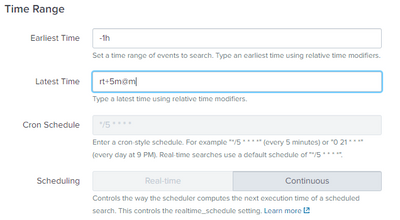
It has just been triggered and I tried searching for the matching event for the past day with no luck.
Expanded my time range to 90 days and I found matching events during the past month only.
Is this scenario familiar to anyone?
- Mark as New
- Bookmark Message
- Subscribe to Message
- Mute Message
- Subscribe to RSS Feed
- Permalink
- Report Inappropriate Content

A couple of items. Do not put rt into a modern correlation search. You are likely preventing the search from ending. Continuous tells Splunk to run that search for the time it launched with the window provided. It does not advance the window until the search completes.
Consider how long a search takes to complete and then choose a suitable search interval such as over the last 30 minutes but run every 15 minutes if the search completes in less than the 15 minutes. If your search takes longer to complete than the run interval you get into time back sliding. Meaning Splunk uses continuous mode to ensure it has no time range gaps but if it takes 45 minutes to complete a search that is launched every 30 you over time get notables farther and farther back in time. If you cannot optimize your search immediately to solve the longer run time than schedule interval change to "Realtime" button in the SplunkES UI which is frankly a misleading term. It is not the same thing as "rt". RT means launch this search and keep it running. The search then sucks up a CPU core and all related resources. Bad idea for your search capacity. In a SplunkES sense the term means for the UI run at the time launched for the earliest and latest based off that launch time. So you will get event search time coverage gaps but your search will at least run "now" and make notables for "now" vs three days ago as the time slide worsens.
- Mark as New
- Bookmark Message
- Subscribe to Message
- Mute Message
- Subscribe to RSS Feed
- Permalink
- Report Inappropriate Content

It is probably not a direct answer to your question. But by looking at your printsceen you have selected Continous scheduling, but in the "Latest Time" is formed in real-time format (rt+5m@m).


Join the Splunk Community Slack to learn, troubleshoot, and make connections with fellow Splunk practitioners in real time!
Join Splunk User Groups to connect and learn in-person by region or remotely by topic or industry.
How much can you really learn in 3 minutes?
Event Series: The Agentic SOC: Trust Before Autonomy
Free Professional Services for .conf26 Attendees
