
Join the Conversation
- Find Answers
- :
- Splunk Products
- :
- Splunk Enterprise Security
- :
- Adding Threat Intelligence feed into Splunk ES in ...
- Subscribe to RSS Feed
- Mark Topic as New
- Mark Topic as Read
- Float this Topic for Current User
- Bookmark Topic
- Subscribe to Topic
- Mute Topic
- Printer Friendly Page
- Mark as New
- Bookmark Message
- Subscribe to Message
- Mute Message
- Subscribe to RSS Feed
- Permalink
- Report Inappropriate Content
Adding Threat Intelligence feed into Splunk ES in CSV format

I'm currently trying to upload a malware feed into Threat Intelligence Management.
The feed itself is being pulled from the following URL: https://bazaar.abuse.ch/export/csv/recent/
The issue is that while it is in CSV format, the values themselves are also encapsulated by quotes, so they are being imported into the file_intel like the following.
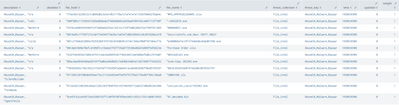
To extract out the actual values since they are surrounded by quotes I put together a regular expression under "Extracting regular expression" which works on regexr and regex101, but this regular expression does not appear to be getting used as the values in the lookup still look like the above.

Here is what the csv looks like.

Is there a setting I am missing that is causing the regex to not be utilized?
- Mark as New
- Bookmark Message
- Subscribe to Message
- Mute Message
- Subscribe to RSS Feed
- Permalink
- Report Inappropriate Content


maby this will work:?
@the parsing tab do the following extracting reg expr: ([^\"\,]+)
- Mark as New
- Bookmark Message
- Subscribe to Message
- Mute Message
- Subscribe to RSS Feed
- Permalink
- Report Inappropriate Content
Oh wait,, after some messing around place the + 1 spot to the left like so:
\b([^\"\,]+)\b

Join the Splunk Community Slack to learn, troubleshoot, and make connections with fellow Splunk practitioners in real time!
Join Splunk User Groups to connect and learn in-person by region or remotely by topic or industry.
Index This | What travels the world but is also stuck in place?
Discover New Use Cases: Unlock Greater Value from Your Existing Splunk Data
Continue Your Journey: Join Session 2 of the Data Management and Federation Bootcamp ...
