
Join the Conversation
- Find Answers
- :
- Apps & Add-ons
- :
- Splunk Development
- :
- Splunk Dev
- :
- Re: unable to install splunk enterprise on windows...
- Subscribe to RSS Feed
- Mark Topic as New
- Mark Topic as Read
- Float this Topic for Current User
- Bookmark Topic
- Subscribe to Topic
- Mute Topic
- Printer Friendly Page
- Mark as New
- Bookmark Message
- Subscribe to Message
- Mute Message
- Subscribe to RSS Feed
- Permalink
- Report Inappropriate Content
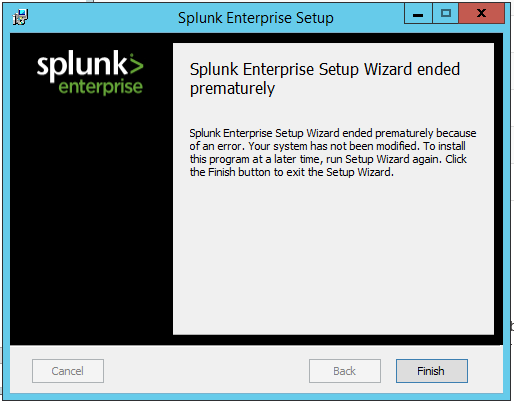
unable to install splunk enterprise on windows server 2012 R2

- Mark as New
- Bookmark Message
- Subscribe to Message
- Mute Message
- Subscribe to RSS Feed
- Permalink
- Report Inappropriate Content
Couple of questions...
1.) Is there/was there another version of Splunk installed on the server?
2.) Does the account you're logged in as have administrative permissions?
3.) Are there global or local group policies preventing you from installing programs from a non-whitelisted directory? For example, I've worked in an environment where users were not allowed to install software from their desktop or downloads folder.
4.) Did you run the installation as an administrator (even if you are logged in as the administrator)?
5.) Did you restart the server and try again?
6.) Is there any security software that might be interfering with the install?
- Mark as New
- Bookmark Message
- Subscribe to Message
- Mute Message
- Subscribe to RSS Feed
- Permalink
- Report Inappropriate Content
1)thier is no another version of Splunk installed on server
2)No..logged in account doesn't have Admin permissions
3)thier is no global or local group policies preventing you from installing programs
4)I didn't run as an administrator
5)ya i restarted the server and tried
6)thier is no security software interfering
i am new to these tool..plz guide me in installing
- Mark as New
- Bookmark Message
- Subscribe to Message
- Mute Message
- Subscribe to RSS Feed
- Permalink
- Report Inappropriate Content
Sorry for the late reply. You'll need to run the installation as an administrator. This link should be helpful for installing Splunk on Windows: http://docs.splunk.com/Documentation/Splunk/6.5.2/Installation/InstallonWindows
Let me know if you have any trouble and I'll be happy to help!



Join the Splunk Community Slack to learn, troubleshoot, and make connections with fellow Splunk practitioners in real time!
Join Splunk User Groups to connect and learn in-person by region or remotely by topic or industry.
Announcing Modern Navigation: A New Era of Splunk User Experience
Analytics Workspace removal in Splunk 10.6
Vibe-coding, AI, and Splunkcraft: Highlights from the .conf26 Builder Bar
